Wednesday, 4 April 2018

very basic post, OEL RHEL change TZ for proper date and time stamps

The little things get to me when I'm troubleshooting, like date and time. 

If I look at the machine and NTP is set up properly but my timestamps are wrong, then generally this is going to be related to TZ. Very simple steps to getting this right for Melbourne: 

 To validate that this is your problem, you can enter the command below: 

It gives you some really cool information about daylight savings and NTP - which you need to know.

[root@ip-10-10-1-235 ~]# timedatectl
      Local time: Tue 2018-04-03 23:24:28 UTC
  Universal time: Tue 2018-04-03 23:24:28 UTC
        RTC time: Tue 2018-04-03 23:24:28
       Time zone: n/a (UTC, +0000)
     NTP enabled: yes
NTP synchronized: yes
 RTC in local TZ: no
      DST active: n/a

Okay, this needs to be fixed!  See how there is no information about DST or TZ

One simple command as root

ln -sf /usr/share/zoneinfo/Australia/Melbourne /etc/localtime

Then viola!

[root@ip-10-10-1-235 ~]# timedatectl
      Local time: Wed 2018-04-04 09:21:07 AEST
  Universal time: Tue 2018-04-03 23:21:07 UTC
        RTC time: Tue 2018-04-03 23:21:06
       Time zone: Australia/Melbourne (AEST, +1000)
     NTP enabled: yes
NTP synchronized: yes
 RTC in local TZ: no
      DST active: no
 Last DST change: DST ended at
                  Sun 2018-04-01 02:59:59 AEDT
                  Sun 2018-04-01 02:00:00 AEST
 Next DST change: DST begins (the clock jumps one hour forward) at
                  Sun 2018-10-07 01:59:59 AEST
                  Sun 2018-10-07 03:00:00 AEDT

Cool, and yes - DST did change on Sunday.  Nice reminder. 

 You can work out your own settings from this example.

Thursday, 29 March 2018

Refresh your orchestrations for testing... Enable Admin Service.

Want to do some orchestration development and tired of making changes in the orchestration studio and not being able to test them in the orchestration client, wow - I know that this got to me after about 3 minutes of development.

All you need to do is enabled the "Enable Admin Service" option for the AIS server that you are pointing to, this is done from server manager under the general tab.  See below for the screen grab.  You need to make sure that the option is ticked, then bounce the AIS server.


Now when you click the XML cache refresh from the orchestration client, you'll get the edition of your orchestration that you just saved, not one from an hour ago!


When it's done right, you'll get the following confirmation


Not the permission error that you previously got.

Tuesday, 27 March 2018

AS/400 migration performance comparison

I need to get this down on paper so I do not forget.

Once again, large (2TB+) AS/400 migration to Oracle (ODA).

Doing some batch performance compares – the easy way.

Quick question though, how many SQL statement per second do you think the ODA can run for a batch job – complete SQL statements?

We are seeing up to 3600 per second – and it’s still slower than the 10 year old 400!!!  WTF?

That AS/400 is capable of some amazing feats.

Anyways, back to the blog.

Here is a way you can replicate a batch load, firstly get a snapshot of performance on the as/400 with something like this:


SELECT JCPID as INNERPID, JCVERS as INNERVERS, trim(simd) || '-' || trim(vrjd),
   count(1) as INNERCOUNT,
   Avg(86400*(JCETDTIM-JCSTDTIM)) as INNERAVERAGE,
   min(86400*(JCETDTIM-JCSTDTIM)) AS INNERMIN,
   max(86400*(JCETDTIM-JCSTDTIM)) AS INNERMAX, avg(jcpwprcd) as "ROWS PROCESSED"
from svm900.f986114@purgatorydb t1,ol900.f9860@purgatorydb, copd900.f983051@purgatorydb, svm900.f986110@purgatorydb t2
where trim(t1.jcpid) = trim(siobnm)
and trim(t1.jcvers) = trim (vrvers)
and trim(t1.jcpid) = trim (vrpid)
and t1.jcjobnbr=t2.jcjobnbr
and t1.jcexehost = 'PURGATORY'
group by 'runube JDE JDE PY900 *ALL ' || JCPID || ' ' || JCVERS ||
CASE  WHEN jcjobque IS NULL THEN N'QBATCH' WHEN jcjobque = ' ' THEN N'QBATCH' ELSE jcjobque END  || ' Batch Hold Save', t1.jcpid, JCVERS, trim(simd) || '-' || trim(vrjd)
having Avg(86400*(JCETDTIM-JCSTDTIM)) > 15 and Avg(86400*(JCETDTIM-JCSTDTIM)) < 15000;


This is going to give you the batch jobs on the AS/400 that on average tool more than 15 seconds and less than 150000 seconds.

My results give me about 700 jobs.

I can then use the list and save it off in excel as a baseline of performance – because this is going to be handy when comparing with oracle.

image

I can then feed this into a file in Linux and rip it apart to generate a script:

cat *.list | awk '{printf("./runube.ksh %s %s >> %s_%s.out\n",$1,$2,$1,$2)}' > runAWR_new.ksh

which creates something like:

./runube.ksh R03B413A S1501 >> R03B413A_S1501.out
./runube.ksh R03B50 S0001 >> R03B50_S0001.out
./runube.ksh R03B500X F5001 >> R03B500X_F5001.out
./runube.ksh R03B50D F8101 >> R03B50D_F8101.out
./runube.ksh R56202 S1501 >> R56202_S1501.out
./runube.ksh R03B571 F5004 >> R03B571_F5004.out
./runube.ksh R03B571 F5000 >> R03B571_F5000.out
./runube.ksh R42800 S5917 >> R42800_S5917.out
./runube.ksh R42800 S1713 >> R42800_S1713.out
./runube.ksh R42800 S1729 >> R42800_S1729.out
./runube.ksh R42800 S1727 >> R42800_S1727.out
./runube.ksh R047001A S0001 >> R047001A_S0001.out
./runube.ksh R09801E ZJDE0001 >> R09801E_ZJDE0001.out
./runube.ksh R11414A S0028 >> R11414A_S0028.out
./runube.ksh R11414A S0002 >> R11414A_S0002.out
./runube.ksh R30601 S0001 >> R30601_S0001.out
./runube.ksh R42995 S8301 >> R42995_S8301.out

I then have my runube.ksh script that does the following:

$ vi runube.ksh
#!/bin/ksh
if [ $# -lt 2 ]
   then
    echo "USAGE: $0 REPORT VERSION"
    exit
fi
echo "set feedback off" > sql$$.sql
echo "EXEC DBMS_WORKLOAD_REPOSITORY.create_snapshot;" >> sql$$.sql
echo "select 'START##' || max(snap_id) from dba_hist_snapshot ;" >> sql$$.sql
echo "quit;" >> sql$$.sql
STARTSNAP=`sqlplus JDE/PASS@JDEPROD @sql$$.sql |grep \#\# |grep -v \'|grep START|awk -F\# '{print $3}'`
echo $1_$2 RUNNING##
echo "<h1> UBE $1 VERSION $2 </h1>">$1_$2_AWR.html
echo "<h2>">>$1_$2_AWR.html
(time runube JDE PASS PD900 *ALL $1   $2     QBATCH     Interactive Hold Save) 2>&1 | grep m |egrep '^user|^sys|^real' >> $1_$2_AWR.html
echo "</h2>">>$1_$2_AWR.html
ENDSNAP=`sqlplus JDE/PASS@JDEPROD @sql$$.sql |grep \#\# |grep -v \'|grep START|awk -F\# '{print $3}'`
#AWR time  <--  This is a comment – how RAD!
echo "set linesize 8000" >sql$$.sql
echo "set feedback off;" >>sql$$.sql
echo "set heading off;" >>sql$$.sql
echo "set verify off;" >>sql$$.sql
echo "SELECT output FROM    TABLE(dbms_workload_repository.awr_report_html ((select dbid from v\$database),(select instance_number from v\$instance),$STARTSNAP,$ENDSNAP,8 ));" >> sql$$.sql
echo "quit;" >> sql$$.sql
cat sql$$.sql
sqlplus JDE/PASS@JDEPROD @sql$$.sql >> $1_$2_AWR.html
rm -f ./sql$$.sq
#aws s3 cp $1_$2_AWR.html s3://mybucketofawr/$1_$2_AWR.html


RAD hey!!

This has done a lot.  Firstly it’s got a baseline of performance stats from the 400

Created a script that will run all of these jobs (one after the other) there is not parallel to make sure that the AWR’s are good

It generates AWR’s for you for each job

It then will put them into an S3 bucket if you are nerdy like me


Then, when you run them all on your new kit, you can have a spreadsheet like the one below which can compare the performance of the AS/400 and the new kit:


image


The spreadsheet can calculate the URL to get to the AWR in S3, so you can distribute these results and ppl can see the reports and see why things are performing the way that they were.

Note that if you do not want the AWR’s or anything like that, you can have the SQL generate a simple and native runube command:

SELECT 'runube JDE PASSPY900 *ALL ' || JCPID || ' ' || JCVERS ||
CASE  WHEN jcjobque IS NULL THEN N'QBATCH' WHEN jcjobque = ' ' THEN N'QBATCH' ELSE jcjobque END  || ' Batch Hold Save',
   t1.JCPID as INNERPID, t1.JCVERS as INNERVERS, simd || vrjd,
   count(1) as INNERCOUNT,
   Avg(86400*(JCETDTIM-JCSTDTIM)) as INNERAVERAGE,
   min(86400*(JCETDTIM-JCSTDTIM)) AS INNERMIN,
   max(86400*(JCETDTIM-JCSTDTIM)) AS INNERMAX
from svm900.f986114@purgatorydb t1,ol900.f9860@purgatorydb, copd900.f983051@purgatorydb, svm900.f986110@purgatorydb t2
where trim(t1.jcpid) = trim(siobnm)
and trim(t1.jcvers) = trim (vrvers)
and trim(t1.jcpid) = trim (vrpid)
and t1.jcjobnbr=t2.jcjobnbr
and t1.jcexehost = 'PURGATORY'
group by 'runube JDE JDE PY900 *ALL ' || JCPID || ' ' || JCVERS ||
CASE  WHEN jcjobque IS NULL THEN N'QBATCH' WHEN jcjobque = ' ' THEN N'QBATCH' ELSE jcjobque END  || ' Batch Hold Save', t1.jcpid, JCVERS, simd || vrjd
having Avg(86400*(JCETDTIM-JCSTDTIM)) > 15 and Avg(86400*(JCETDTIM-JCSTDTIM)) < 15000;


Thursday, 15 February 2018

JD Edwards - JDE and the bot - your turn to play!

Want to know how easy it is to use voice and JDE?


This is it!

Purchase order approvals:


This is a sample PO approval conversation

You can talk to our bot about JDE.

For instance, ask it if you have any purchase orders to approve today?

You can then ask it, tell me about the second one (or 6th or 12th)

You can ask it to approve that order, it will prompt you for a reason - and it's done.

Meter readings:


This is a sample Meter Reading update

What is the current meter reading for yellow digger?
add 4 to that.

Job done...

These are very simple interactions that we can enable for you and your  installation of JDE.  This is using the power of AIS (or/and orchestration) if you like to create real-time integrations with JD Edwards.


Not only does this bot do what you ask, but it learns from your interactions.  We can also teach it how to react to certain requests.


Wednesday, 31 January 2018

Setting up security for Orchestration Studio 6.0

Let's fix UDO security for orchestration notification button

image
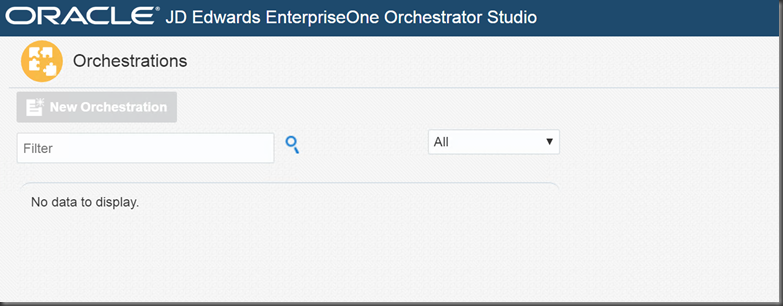
Cannot add orchestration

image
Also cannot see the notifications button...

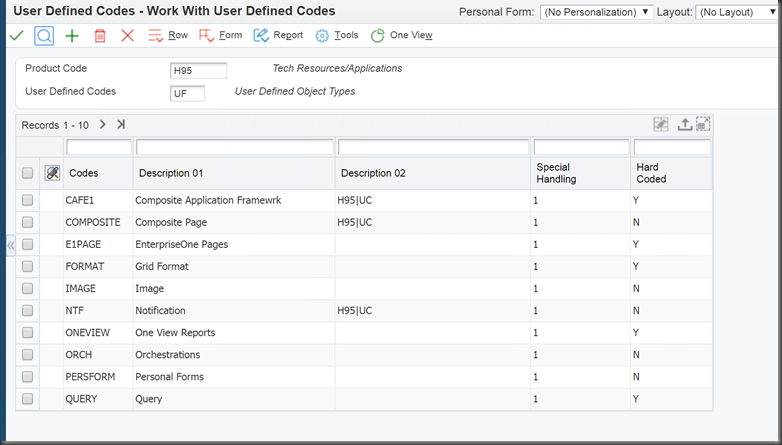
Make sure that you have these UDC's, the list below is correct for 9.2
image
I was able to change the security setting below for NTF
Security before:
After

Clear cache from SM
image
Reset the cache (JDBj) via server manager

image

Great, now I can add notifications!

Let's fix the security for orchestration now.

Above can now be chosen
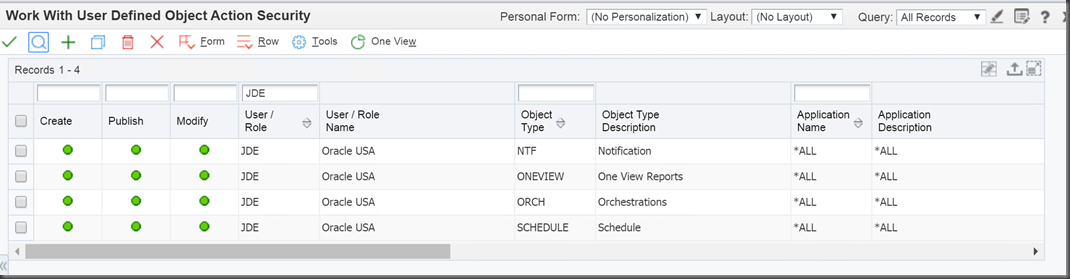
Create UDO action security for NTF, SCHEDULE and ORCH
image

image

Should look like below
image

Now we can add a new orchestration!


imageNow lets download some samples to view what we need to orchestrate
Note that there is a download type of EnterpriseOne Orchestrator
image

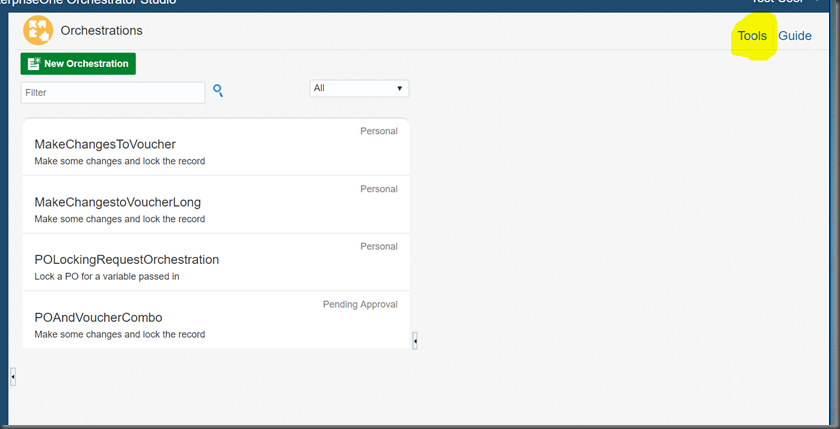
Now goto tools menu from orchestration login

image
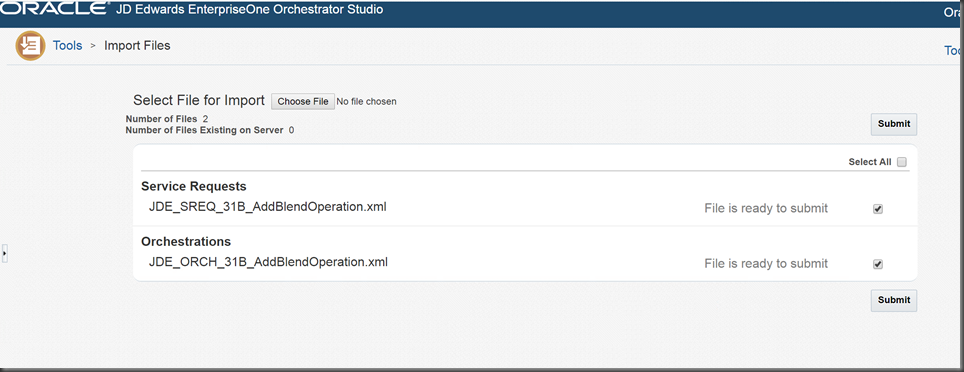
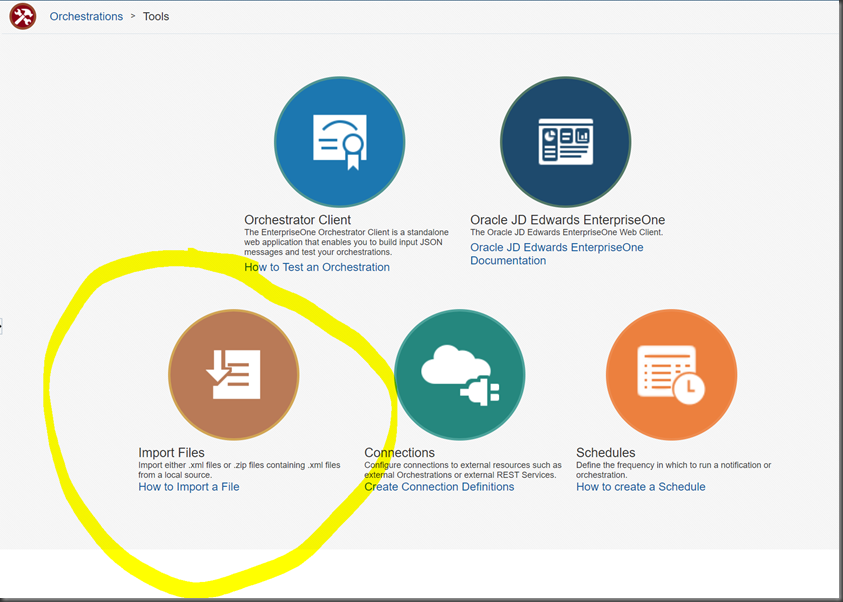
Import files, hit the BIG brown button
image

Save the par files and rename them to zip files.

image

Choose the file from the downloaded items

image

It shows you the included operations, note that these include orchestrations and service requests

Nice, we can now choose to edit the components


We can also see all of the edit controls, because our UDO security is correct
image

Sharing orchestrations

I’ve been developing some orchestrations and am having a great time, no honestly.  There is so much power and so much productivity that you can implement using orchestration.  Notifications and subscriptions (although a little clunky) are also very cool.  I’ll do a bunch of blogging in this area, as it’s very cool.

But, let’s focus on a little issue I have.

I’ve been testing JD Edwards transaction processing (TP), locking and reservations using HTML, AIS and orchestration.  This involves different users and often different users trying to run the same code.

I WAS logging into the orchestrator and exporting my zip files and then importing with another user.  This is nice and easy, but not the correct way of doing things.

When calling with the alternate user, I get

{   "message" : "Endpoint not defined: POandVoucherCombo. Add the orchestration, or make sure it is shared to this user.",   "exception" : "java.lang.Exception",   "timeStamp" : "2018-01-31:02.28.59"
}

Method 1: save and restore:

image

Login to orchestration studio as user that created the orchestration.

edit the orchestration

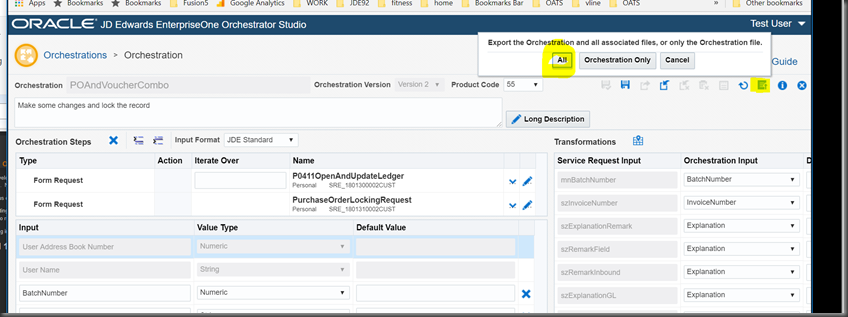
Choose the export button, then ALL (this will include the rules and service requests and everything).

Import

image

Find the tools exit and choose import


image

Easy, choose the zip file that you created and you are away


image

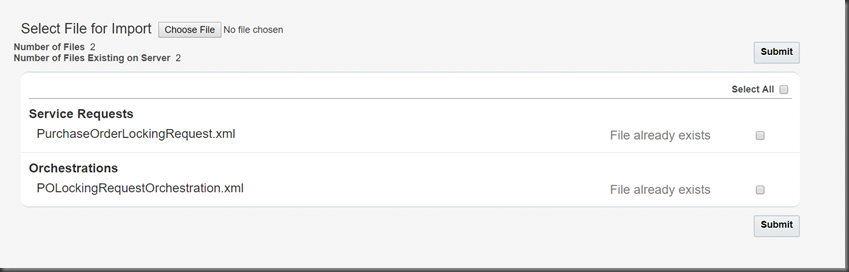
Note they exist for me.  If they did not – just tick the box and choose submit!

Method 2: Fix security – share the UDO

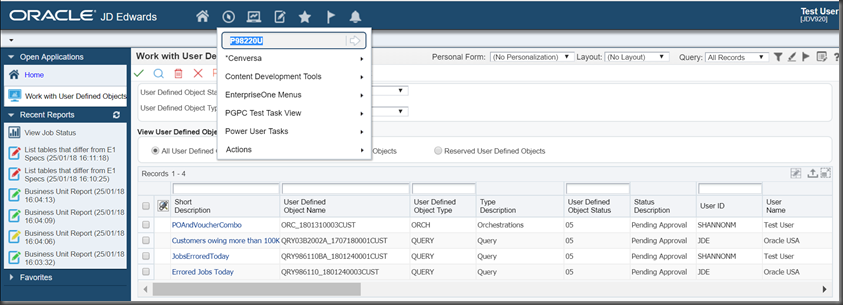
run P98220U

image

You’ll see orchestrations of various status

The orchestration that I’m dealing with is below, note that I’ve already selected the publish button.  My only options now are to reserve it so that I can publish it again.

image

Note that if I select reserve

image

The P9822OU changes immediately to editing

image

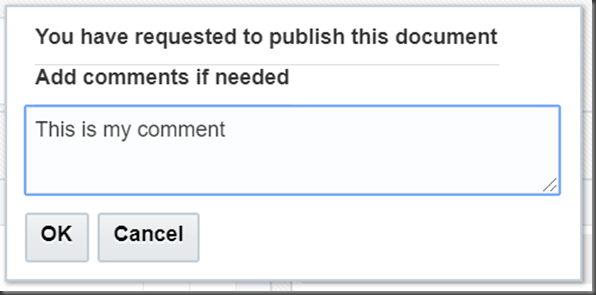
Let’s hit the request

image

image

And now it’s pending in JDE

image


How cool, the comments are in the MO – love it!

image

Lets share this awesome orchestration

image

Easy!!! – shared with public!

image

Unless you have it reserved, you cannot use it in the client:

image

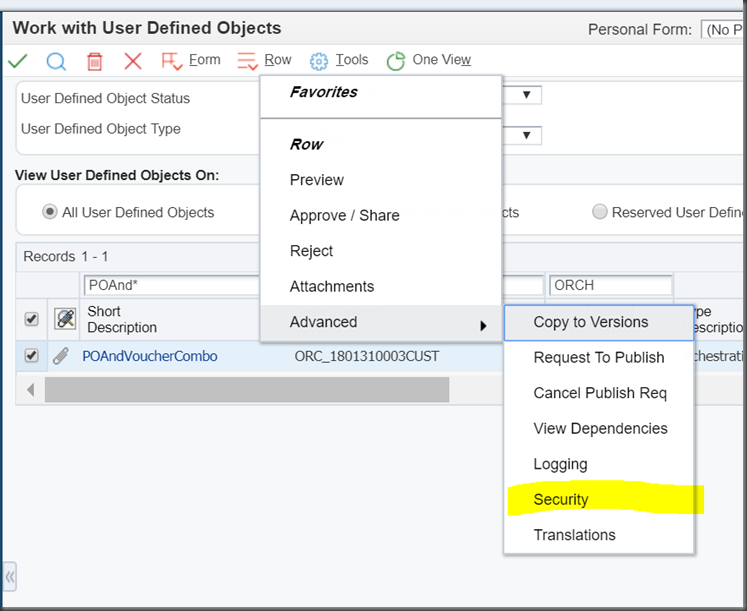
So, you need specific security for the UDO to be able to run and see the shared orchestration

From P98220U

image

Now choose the “Revise View Security” tab

image

Enter the user names to share to and click SAVE (unlike me)

image

And now!

image


{   "message" : "ServiceRequest P0411OpenAndUpdateLedger.xml := java.io.IOException: P0411OpenAndUpdateLedger Not Found.  Check permissions of the UDO.",   "exception" : "java.lang.Exception",   "timeStamp" : "2018-01-31:03.04.48"
}

Okay, at least I get a different error now, this is a service request security problem, not orchestration problem.  I can fix that with all of the above mechanisms.

Tuesday, 30 January 2018

Error Error: Login Failed User is not included in the AIS server White List, contact your server administrator

I just created a new user, essentially GOD in JDE.

but it gets the following error when trying to log into the orchestration suite:


Note that it does not get this error when logging into the orchestration client (directly to AIS), so the error is a little bit strange!

A quick check of support.oracle.com shows me an error found in 9.2.1.2 - great -that is our release.

go here:  https://support.oracle.com/epmos/faces/DocContentDisplay?_afrLoop=249178588426576&id=2040956.1&_afrWindowMode=0&_adf.ctrl-state=10h8xp9h9n_145

Funny thing is that is works as JDE, but not as another user.  So I decided to follow the following option2 (as option 1 was for windoze).

Option 2:
a. take a backup of the config.xml file found in the 'WebLogic_home\user_projects\domains\AISDomainLocation\config' directory
b. add the '<enforce-valid-basic-auth-credentials>false</enforce-valid-basic-auth-credentials>" entry to the config.xml just before the closing
tag of the Weblogic Server domain:

myrealm
{AES}25la24ZXYsP1hsgwbVl7Qa6T6UxFeF/D2PN57oYOgOe1rmBOQYhviia/HoFghUXIeoYsJFteAhHWzaD0D4L8tykrYsYRnt/kzS3AQWPwZuc+jwLOE9r1LwyneM8dhHr6
weblogic
{AES}MtUDlUBN2E8NLXcHI3v/VE9AU3F3bwiMMqPBOBVGcPw=
false
true

backup your config.xml file from you domain home config dir

[oracle@ip-10-10-1-235 config]$ cp config.xml confix.shannon.xml
[oracle@ip-10-10-1-235 config]$ pwd
/Oracle_Home/user_projects/domains/e1apps/config

vi this file and add the line in bold

    weblogic
    {AES}UitOE/8SEeR3PneMozFFmPnhLCyzAzXEC4A8WUtUtHk=
false
    true
 
 
    AdminServer
   

Note that I had my AIS server, ADF and everything under the same home.  So I do not need to do this multiple times for multiple config.xml's

The fact that I get this problem with orchestration studio, means that I need to restart 9401, but I'll probably do my AIS server also.

Okay, so none of that made any difference.  It seems that you need to add this to the AIS server config for allowed users...

Change the SM view to advanced, then general.

Admin Service Allowed User List Help

Once I did this and synchronised rest.ini, then stopped and then started...  

We finally could login as another user.