Wednesday, 22 July 2020

JDE Table Explorer

Have you ever wanted to quickly determine what all of the columns in a table was?  Really wanted to know the DD items for a table or where is a system code you would find a particular DD item / alias?  Have you ever wanted to search through all the media objects for DD items to find the relevant error message / table text description.  Well, I know that I have...

Use the report here:  https://datastudio.google.com/s/neT7hDi2pes

Have I got a treat for you - here is my JDE Table explorer.  I've developed this after hours over the last 3 or 4 nights.  It's been a very interesting task involving a lot of new technology.  Once again, I cannot speak highly enough of google data studio, this platform has enabled me to visualize data like nothing else.  It's amazing and I'll continue to promote and embrace it's capabilities.  The work that my team have done with sending data from JDE to the cloud and enabling this engine to visualise data has been great to watch.


The above shot, shows you in essence what you can do...  Choose any of the drop downs and start to look at the JDE table definitions.  All tables and all information.

I know that there are a lot of options out there for looking at the JDE table definitions.  I wanted this to be super simple and have google like search capability....  Just look in any of the fields really quickly.

I do want to extend this, but you need to start somewhere.

Remember that if you use the 3 dots, you can export to excel very easily.

You can select a system code or a DDAlias and quickly see all of the tables that use those attributes.

It's super easy and flexible.  This is 9.2 with all the updates!


Monday, 20 July 2020

Metric sliders... Thanks for the enhancements datastudio

I have a confession, I love data – and this is a cool feature that has just been released in google data studio:


This has taken data analysis and filtering to a whole new level.


So now I can restrict what I see in a control to the slowest pages or the fastest by using the sliders.


This is going to be great for UBE performance also.


we all know, but... Where are my business services actually running?

How can we tell what BSSV server is going to be used?


Pretty simple, we look at the service configurations, I fast path to P986110 zjde0003


Potentially the tip above is the best thing about this post, quickly getting to the service definitions.


Choose the data source you want, then boom!


But as you know, this can be a hard choice...  Like below, there are so many servers / sources.


We all know the difference between server map and system data sources?  Yes!


The server map is where server based functions (BSFN or UBE) look to find things.  Thats right, BSFN.  In JDE most of the business functions run on the enterprise server (well, those that are written in C as BSFNs and those that are converted to C as NERs).


The System is where interactive web processes look to find things.


Therefore, if you call a BSSV from a system function – this is going to use the system mappings.


If you call a BSSV using a BSFN or NER – these are going to use the servermap to work out where they are going to run!  Therefore you need to look at the location where the BSFN is going to run in System (which is generally the DEFAULT BSFN map as below).  Then when you find that server, look at it's servermap to find where the BSSV is going to run.  

Finally, look at any magic in host name overrides, because honestly - the JDE logic server does not really care about load balancers or host overrides - the jdenet kernel will send network traffic to the IP address that is given from the hostname in the service definition.


Tuesday, 7 July 2020

follow up WSAECONNRESET in jde log files - using KeepAliveTime in windows 2012 R2

It all started here:  https://shannonscncjdeblog.blogspot.com/2020/06/help-with-excessive-wsaeconnreset.html

Too many of these in the logs:  WSAECONNRESET 

I like this font, so I'm going to continue with it.

I raised a call with oracle, asking them if jde uses anything like keepAlive, and yes they do.  If you look in the JDE.INI under [JDENET] you'll see useKeepAlive, which is enabled as a default...

So this had me crushed.  JD Edwards has this enabled, yet I'm still getting my connections being terminated - but here is the thing - this setting only inherits the operating system settings for keep alive.  What!!  This means that I still have a chance.

After I checked the registry, the setting was not enabled - what an emotional roller coaster hey!  So there were no OS settings for JDE to enforce in it's socket operations.  This is good news.  We need to set a time in the following registry entry of 20 minutes so that the connections are tested at that interval.

HKLM\SYSTEM\CurrentControlSet\Services\Tcpip\Parameters\KeepAliveTime

This is set to a time that windows will send some activity and prevent the FW then killing the connection because of inactivity.  More details here: https://docs.microsoft.com/en-us/archive/blogs/nettracer/things-that-you-may-want-to-know-about-tcp-keepalives

We are in the process of getting this tested on non-production servers - watch this space.


Monday, 6 July 2020

Quantification of performance gains in JDE

I'm assisting a client move to a new database platform at the moment, and we are trying to work out if this has been a successful move or not.  Success has many measures, but performance is a critical measure.

If you are not going to spend 30K on performance testing (let's be honest, this is what it is going to cost), then how are you going to determine whether you have improved your user experience?

We were lucky enough to have ERPinsights installed in non production before this project kicked off, so we had about 40 days of performance history to compare against.  This means that we had 40 days history of EVERY batch job, and every page load.  Using this data with some intuitive reporting (cue me) and we are able to give the client some very string indications whether things have improved or not.

Interactive

 The move actually occurred on the 18th of June.  Can you see we definitely had some issues.  The server response time when from around .7 of a second (which is slow BTW) to over 2 seconds.  This is how long it was taking for the server to start to respond to the user request.  This does not include the download time or the page render time.  In my experience, this is a key indicator to server problems.

The team did some scrambling and found a pretty neat setting for VMWare and the implementation of this on the 22nd seemed to have done the trick.  The client is now getting better performance in non production than they ever were - 27% improvement based on all of the history and 11% on the previous best period.

These figures were based on over 223,000 page loads and the cumulative experience of 335 users.

Batch

The table below allows us to compare before the change to after the change, we can see rows processed and average runtime.  You'll see that the triangle (delta) in the final column is the change in average runtime between the periods specified.  Green arrow is good and red arrow is bad.  We can see from below that on average we are looking much better.


We can see any trending graphically too, looking at runtime, rows, number times run or waittime

385 jobs have been run in non-production environments in the last 9 days that were run also in the 9 days before that.  Of those jobs, 270 ran quicker in the last 9 days.  

Don't forget your package build

The full build is a good litmus test.  If you are moving database or platform, compare your full build times.  They should be around 2 hours.  Remember though, this is not an interactive performance benchmark, just a good thing to compare high traffic and database intensive activities in JDE.


Friday, 3 July 2020

JD Edwards continuous Delivery


This is an important thing to know & understand if you are running JD Edwards - CD - or as I like to call it, CD3


  • Continuous Delivery
  • Continuous Development
  • Continuous Deployment


So it seems that with the amount of infinity symbols in the latest slide deck, oracle are finally on board with CD/CD adoption.  I've been hinting at this for some time.

But, the next matrix that needs constant attention is the JDE support matrix.

Read here https://www.oracle.com/webfolder/technetwork/tutorials/jdedwards/FAQ/JD%20Edwards%20Premier%20Support%20and%20Continuous%20Delivery%20Announcement.pdf 

Oracle Applications Unlimited Extended Through at Least 2031 
We listen carefully when our customers share their business needs and we recognize that your Oracle on-premise applications are critical to your success. We are committed to helping you succeed. 
Applications and Support—an Unbeatable Combination 

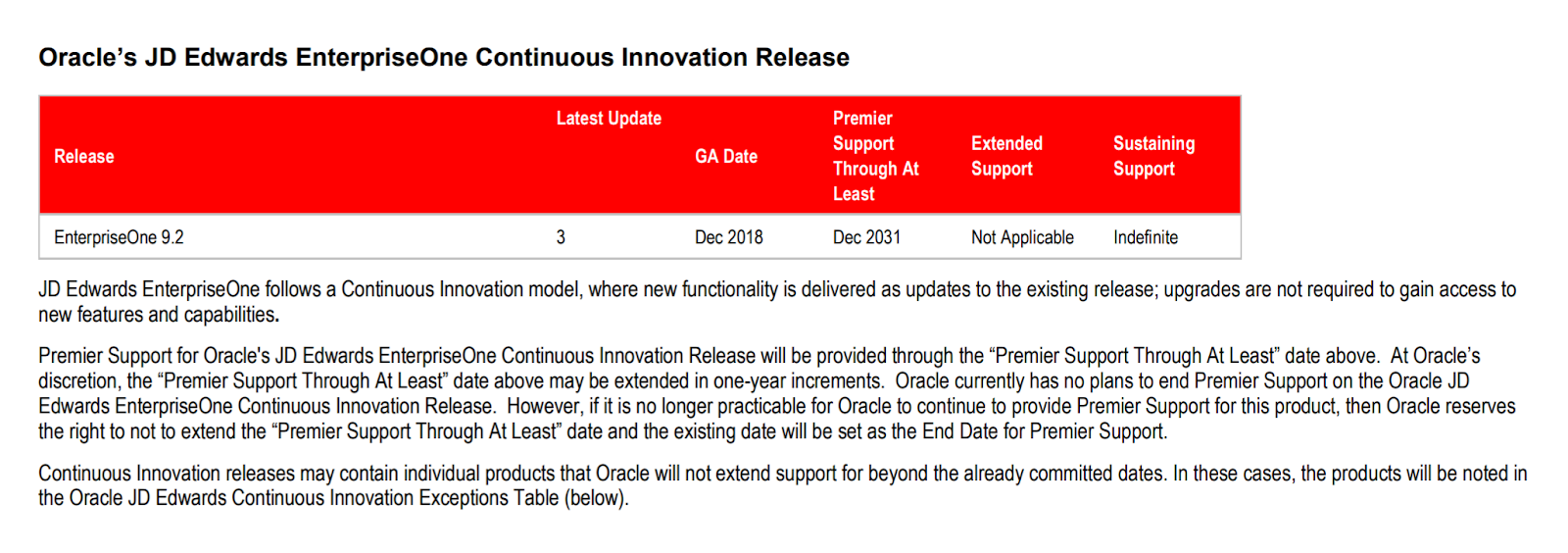
To demonstrate our ongoing commitment to your business, we are announcing an extension through at least 2031 for our Oracle Applications Unlimited Products including JD Edwards EnterpriseOne. Doing so provides you with more than a decade of ongoing product development, new features, and innovations on the Continuous Innovation releases and continued Oracle Premier Support. As an Oracle Applications Unlimited customer, we are here to help support your company’s plans. Your long-term business strategy guides your company to success—underpinning that success are the Oracle products and trusted support you depend on to run your business.\


From this amazing document (it's kept up to date!)  The ONLY JDE E1 release that you can currently get fixes for is 9.2.  That's it.
IF you are on any of these releases, you need to start to consider your options very seriously.
We have an exciting new program where we look at our clients investment in JD Edwards and provide a complete 10 year road map - covering all aspects of TCO.  We provide you with all of the options for your JDE instance, whether you want to sweat it or keep it up to date.  Reach out if this interests you.  You may be surprised how good it is to have a 10 year plan in your back pocket - you can save a lot of doh! (that was a Simpsons joke).