Tuesday, 18 July 2017

Database not starting

First thing is to look into the trace dir / logs dir for your database, it’ll look something like:

/u01/app/oracle/diag/rdbms/jdetest/JDETEST1/trace

I find that alert_JDETEST1.log (this is for RAC) is the best place to start, goto the bottom:

ARC0: STARTING ARCH PROCESSES COMPLETE

Errors in file /u01/app/oracle/diag/rdbms/jdetest/JDETEST1/trace/JDETEST1_ora_46405.trc:

ORA-19815: WARNING: db_recovery_file_dest_size of 499289948160 bytes is 100.00% used, and has 0 remaining bytes available.

************************************************************************

You have following choices to free up space from recovery area:

1. Consider changing RMAN RETENTION POLICY. If you are using Data Guard,

then consider changing RMAN ARCHIVELOG DELETION POLICY.

2. Back up files to tertiary device such as tape using RMAN

BACKUP RECOVERY AREA command.

3. Add disk space and increase db_recovery_file_dest_size parameter to

reflect the new space.

4. Delete unnecessary files using RMAN DELETE command. If an operating

system command was used to delete files, then use RMAN CROSSCHECK and

DELETE EXPIRED commands.

************************************************************************

Cool, the database have given me all of these good ideas!

But, I cannot start the database – so I cannot run RMAN. 

Chicken or the egg?

So I can see that I’m using all 465G of recovery area.  I need to extend this to be able to start the database properly so that RMAN will work.  So I update the size allocated (as I still have space available on the device) with the commands below

sqlplus / as sysdba

SQL>show parameter db_recovery_file_dest_size

NAME TYPE VALUE

------------------------------------ ----------- ------------------------------

db_recovery_file_dest_size big integer 465G

SQL> alter system set db_recovery_file_dest_size=500G ;

I forget, you might need to startup nomount at the SQL command on one of the RAC nodes (the one that you are on)

Then shutdown the database and start it normally (note that I’m only starting a single instance for the time being – not the RAC instance).

then

>rman / target

RMAN> delete noprompt archivelog all completed before 'sysdate - 1/24';

RMAN> quit

Nice, for a non DBA, I have my database back up and running.

Thursday, 6 July 2017

A CNC approach to oracle archive logs getting filled

Truncate them!  obvious…

No, kidding…  We do a lot of work with temp environments and large statements and sometimes that can cause various problems with filling archive logs…  I was getting issues when importing large tables using impdp.  Of course, I do not care about the archive.

Errors like this:

UDI-00257: operation generated ORACLE error 257

login as oracle to the database server.  And delete all archive up to the current time – 1/24 (I did rip this off the net – sorry I missed the credit).

. oraenv

rman

connect target

delete noprompt archivelog all completed before 'sysdate - 1/24';

quit

It’ll plow through the archive and let your statements run again

Wednesday, 5 July 2017

https://edelivery.oracle.com and wget

This is a cool enhancement / feature that I noticed the other day.

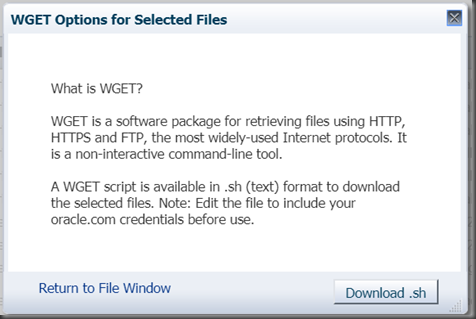
When downloading software from edelivery, I see:

image

the wget option at the end.

You can choose this and download a script:

image

You can cut and paste the script to your linux machine, and if the proxy is set up right, you can do the gets.

This has multiple advantages – but primarily if you do not have a graphical interface, you can do all of your downloading.


#!/bin/sh

set -x

#
# Generated onTue Jul 04 14:19:56 PDT 2017# Start of user configurable variables
#
LANG=C
export LANG

# SSO username and password
read -p 'SSO User Name:' SSO_USERNAME
read -sp 'SSO Password:' SSO_PASSWORD


# Path to wget command
WGET=/usr/bin/wget
# Location of cookie file
COOKIE_FILE=/tmp/$$.cookies

# Log directory and file
LOGDIR=.
LOGFILE=$LOGDIR/wgetlog-`date +%m-%d-%y-%H:%M`.log
# Output directory and file
OUTPUT_DIR=.
#
# End of user configurable variable
#

if [ "$SSO_PASSWORD " = " " ]
then
echo "Please edit script and set SSO_PASSWORD"
exit
fi

# Contact osdc site so that we can get SSO Params for logging in
SSO_RESPONSE=`$WGET --user-agent="Mozilla/5.0" --no-check-certificate https://edelivery.oracle.com/osdc/faces/SearchSoftware 2>&1|grep Location`

# Extract request parameters for SSO
SSO_TOKEN=`echo $SSO_RESPONSE| cut -d '=' -f 2|cut -d ' ' -f 1`
SSO_SERVER=`echo $SSO_RESPONSE| cut -d ' ' -f 2|cut -d '/' -f 1,2,3`
SSO_AUTH_URL=/sso/auth
AUTH_DATA="ssousername=$SSO_USERNAME&password=$SSO_PASSWORD&site2pstoretoken=$SSO_TOKEN"

# The following command to authenticate uses HTTPS. This will work only if the wget in the environment
# where this script will be executed was compiled with OpenSSL. Remove the --secure-protocol option
# if wget was not compiled with OpenSSL
# Depending on the preference, the other options are --secure-protocol= auto|SSLv2|SSLv3|TLSv1
$WGET --user-agent="Mozilla/5.0" --secure-protocol=auto --post-data $AUTH_DATA --save-cookies=$COOKIE_FILE --keep-session-cookies $SSO_SERVER$SSO_AUTH_URL -O sso.out >> $LOGFILE 2>&1

rm -f sso.out


  $WGET  --user-agent="Mozilla/5.0" --no-check-certificate --load-cookies=$COOKIE_FILE --save-cookies=$COOKIE_FILE --keep-session-cookies "https://edelivery.oracle.com/osdc/download?fileName=V43852-01.zip&token=b0ZNSVUrOU45MFhWb1VZd1Z2NHcrQSE6OiF1c2VybmFtZT1FUEQtU0hBTk5PTi5NT0lSQE1ZUklBRC1JVC5DT00mdXNlcklkPTE4MTI0NTkmY2FsbGVyPVNlYXJjaFNvZnR3YXJlJmNvdW50cnlJZD1BVSZlbWFpbEFkZHJlc3M9c2hhbm5vbi5tb2lyQG15cmlhZC1pdC5jb20mZmlsZUlkPTcwNDE5ODEzJmFydT0xNzM1MjA4OSZhZ3JlZW1lbn10cnVl" -O $OUTPUT_DIR/V43852-01.zip >> $LOGFILE 2>&1


  $WGET  --user-agent="Mozilla/5.0" --no-check-certificate --load-cookies=$COOKIE_FILE --save-cookies=$COOKIE_FILE --keep-session-cookies "https://edelivery.oracle.com/osdc/download?fileName=V43853-01.zip&token=ejlqREVLRzV0R0pQeUZKNGlWYU56ZyE6OiF1c2VybmFtZT1FUEQtU0hBTk5PTi5NT0lSQE1ZUklBRC1JVC5DT00mdXNlcklkPTE4MTI0NTkmY2FsbGVyPVNlYXJjaFNvZnR3YXJlJmNvdW50cnlJZD1BVSZlbWFpbEFkZHJlc3M9c2hhbm5vbi5tb2lyQG15cmlhZC1pdC5jb20mZmlsZUlkPTcwNDE5ODEyJmFydT0xNzM1MjA5MCZhZ3JlZW1lbnRJZD0zMzkxNDg4JnNvZnR3YXJlQ2lkcz0mcGxhdGZvcm1DaWRzPTYwJnByb2ZpbGVJbnN0YW5jZUNpZD0tOTk5OSZkb3dubG9hZFNvdXJjZT13Z2V00cnVl" -O $OUTPUT_DIR/V43853-01.zip >> $LOGFILE 2>&1


In this instance I was trying to download a couple of files.

You can also see that I’ve added set –x to my script as I needed to debug some proxy settings, this is a good option, as the script does not have a lot of output if things are going wrong.

Thanks oracle, this is a nice feature!

Tuesday, 4 July 2017

rapid data selection entry the easy way–thanks James!

Have you ever lamented entering in loads of items into data selection?  Had them in a spreadsheet and thought this should be easier! 
Ever wanted to cut and paste from a spreadsheet directly into data selection?  Well, today might be your day.
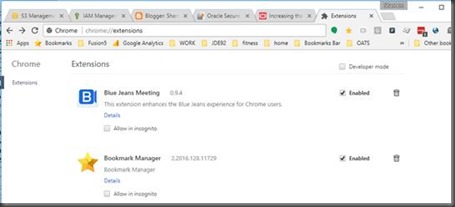
in your browser Goto chrome://extensions (yes – this is chrome only)
clip_image001
The official release is here:


clip_image004
What does it do?
clip_image006

2 cool things

You can cut and paste data selection – totally RAD
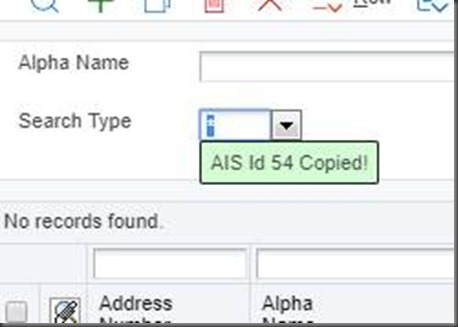
You can identify object identifications
clip_image008  (shift and left click will copy the id to the clipboard)
In the instance above, 54
Now the big one, ever needed to cut and paste 100 items into data selection?
No more.
Grab your column from a spreadsheet, and just paste
clip_image009
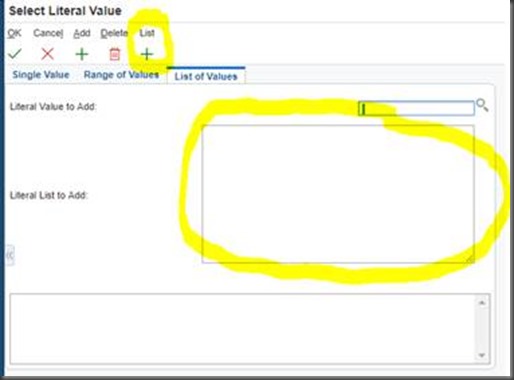
See there is two new controls, somewhere to paste data selection and somewhere to trigger the action.
Just paste your values in from a spreadsheet:
clip_image010
Then hit Add!
Wow, that might have just saved you a lot of time.
All thanks to James for putting this neat plugin together.
Now that you know how this works, please let us know any other enhancements or productivity gains that we could put into the plugin.


JD Edwards Test Monitoring

Ever wondered how much testing is actually being done?  Would you like to know what applications are being test and who is testing them?  Continuous delivery forces us to know more about our users and our modifications.

We have an automated service which will send a testing summary on a daily or weekly basis, letting you know who has logged in, what applications have been run and how long the “testing engagement” was running.  We can compare this to production and let you know what has been missed.  Sounds good?  Get in contact!  

You need this information to give your users focus in their testing and give people confidence that everything has been tested.

https://www.fusion5.co.nz/solutions/enterprise-resource-planning/jd-edwards/erp-analytics/

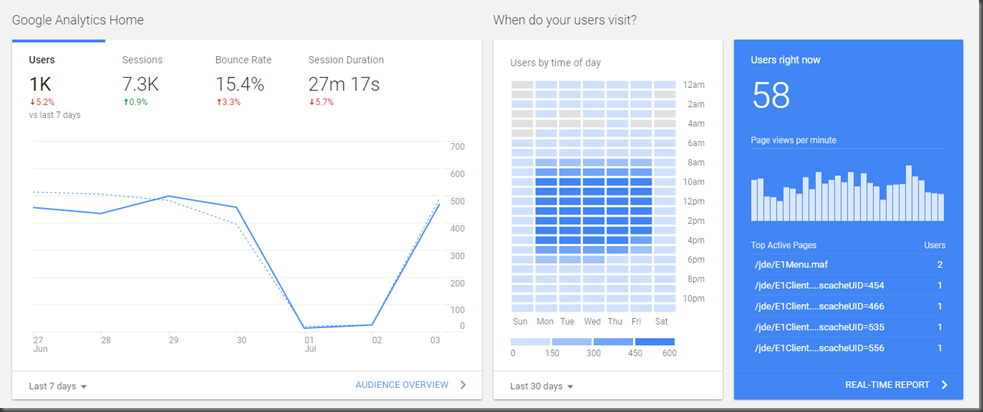
See modern dashboards with heat maps of user activity and actual current usage.

image

See your Testing usage v/s production

image

Drill down to see the users that are logging in and the applications that are being run.

JDE UBE automatic AWR for jobs

This is easy and cool and you could do a lot more with it.  You’ll understand what I mean when I’m done.

When tracking down performance problems wouldn’t it be nice to see all of the tracing behind the scenes. 

You no not need stats pack it seems to get this cool information:

"Gathering database statistics using the AWR is enabled by default and is controlled by the STATISTICS_LEVEL initialization parameter. The STATISTICS_LEVEL parameter should be set to the TYPICAL or ALL to enable statistics gathering by the AWR. The default setting is TYPICAL. Setting STATISTICS_LEVEL to BASIC disables many Oracle Database features, including the AWR, and is not recommended." Thanks Tom, one of the few articles I understood https://asktom.oracle.com/pls/apex/f?p=100:11:0::::P11_QUESTION_ID:9522853800346871377 

Great, standard edition is going to be fine too.

Here is the script that you’ll need, it does the following:

  1. create AWR snapshot (begin)
  2. run UBE, with unix time also
  3. create AWR snapshot (end)
  4. run AWR report based upon the two snapshots
  5. aws s3 cp the AWR to an AWS S3 bucket for review
  6. used a generated link in excel to point your results (summary of F986110|F986114) to the html file in the bucket.

Holy moly!

The script:

if [ $# -lt 2 ]
  then
   echo "USAGE: $0 REPORT VERSION"
   exit
fi
echo "set feedback off" > sql$$.sql
echo "EXEC DBMS_WORKLOAD_REPOSITORY.create_snapshot;" >> sql$$.sql
echo "select 'START##' || max(snap_id) from dba_hist_snapshot ;" >> sql$$.sql
echo "quit;" >> sql$$.sql
STARTSNAP=`sqlplus JDE/JDE@JDETEST @sql$$.sql |grep \#\# |grep -v \'|grep START|awk -F\# '{print $3}'`
echo $1_$2 RUNNING##
time runube JDE JDE PY900 *ALL $1   $2     QBATCH     Interactive Hold Save 2>/dev/null
ENDSNAP=`sqlplus JDE/JDE@JDETEST @sql$$.sql |grep \#\# |grep -v \'|grep START|awk -F\# '{print $3}'`
#AWR time  <--  This is a comment – how RAD!
echo "set linesize 8000" >sql$$.sql
echo "set feedback off;" >>sql$$.sql
echo "set heading off;" >>sql$$.sql
echo "set verify off;" >>sql$$.sql
echo "SELECT output FROM    TABLE(dbms_workload_repository.awr_report_html ((select dbid from v\$database),(select instance_number from v\$instance),$STARTSNAP,$ENDSNAP,8 ));" >> sql$$.sql
echo "quit;" >> sql$$.sql
cat sql$$.sql
sqlplus JDE/JDE@JDETEST @sql$$.sql > $1_$2_AWR.html
rm -f ./sql$$.sql
aws s3 cp $1_$2_AWR.html s3://mybucketofawr/$1_$2_AWR.html

The script is run as the jde user that runs the services.  You need to ensure that it can connect to the relevant database that JDE connects to.  I could put some #defines / exports, but you get the picture.

So, if I run this at the command line:

./runube.ksh R0010P XJDE0001

It does everything for me and creates an AWR HTML file in my S3 bucket.

[jde900@bear AWR]$ ./runubedemo.ksh R0010P XJDE0001
R0010P_XJDE0001 RUNNING##

real 0m1.744s
user 0m0.322s
sys 0m0.182s
set linesize 8000
set feedback off;
set heading off;
set verify off;
SELECT output FROM    TABLE(dbms_workload_repository.awr_report_html ((select dbid from v$database),(select instance_number from v$instance),1956,1957,8 ));
quit;
upload: ./R0010P_XJDE0001_AWR.html to s3://mybucketofawr/R0010P_XJDE0001_AWR.html

Note that this is nice, shows you if the job was CPU intensive too (at the logic tier). 

  • Real: this is the wall clock time. If other processes are running at the same time, they will slow down your process and thus will increase "real".
  • User: the time that CPU spent on your program in user mode.( Kernel mode does not counted in this. For example you requested a disk IO and your disk is very slow. Such a system call is invoked on kernel mode, therefore it will not be reflected to "user".)
  • Sys: the time that CPU spent on kernel mode during the execution. Kernel mode contains operations like disk IO, network IO, devices, memory allocation etc. (Part of the mem. allocation is still in user space, though.)

Then you get to goto https://s3-ap-southeast-2.amazonaws.com/mybucketofawr/R0010P_XJDE0001_AWR.html and you can see the actual report!

So, I create a simple spreadsheet based upon the output of the following

SELECT JCPID as INNERPID, JCVERS as INNERVERS, rtrim(JCPID) || rtrim(JCVERS) as CONCAT_PID_VERS, vrjd,
   count(1) as INNERCOUNT,
   Avg(86400*(JCETDTIM-JCSTDTIM)) as INNERAVERAGE,
   min(86400*(JCETDTIM-JCSTDTIM)) AS INNERMIN,
   max(86400*(JCETDTIM-JCSTDTIM)) AS INNERMAX,
   avg(jcpwprcd) as "ROWS PROCESSED"
from svm900.f986114, py900.f983051
where  trim(jcvers) = trim (vrvers) and trim(jcpid) = trim (vrpid)
and (JCETDTIM + interval '13' hour) < TO_DATE('14012018','DDMMYYYY') and (JCETDTIM + interval '13' hour) >= TO_DATE('18062017', 'DDMMYYYY')
group by jcpid, JCVERS, vrjd ;
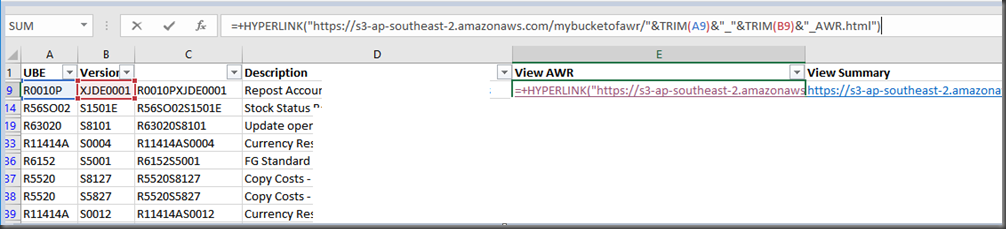


image

Great!  so you could now write a custom exit (or – WOW an CAFE1 page) that would link to the AWR automatically.  That’s a nice solution to see the performance stats of your UBEs.

It would also be easy to put this into a “OSA” to make it automatic for mapped UBE’s

Monday, 3 July 2017

Ever wanted to shrink a datafile?

Are you like me and you might get a little bit too aggressive on space creation – ask for 4TB not 1…

Anyway, reality might mean that you need to scale things back, so here is some handy commands to do that:

see the size of the data files:

SELECT name, bytes/1024/1024 AS size_mb

FROM v$datafile;

Shrink datafile –

ALTER DATABASE DATAFILE '/u02/app/oracle/oradata/datastore/CRDTAI.dbf' RESIZE 1024G;

ALTER DATABASE DATAFILE '/u02/app/oracle/oradata/datastore/CRPDTAT.dbf' RESIZE 800G;

It’s that simple (well it was for me).