Saturday, 23 June 2018

What good performance looks like–Good to Great


Lots of clients at the moment are getting rid of their proprietary CPU architecture.  This comes in the form of RISC type implementations and moving to commodity x86 architecture.  There are a lot of advantages in this, but the primary seems to be the strategic of enabling an easier cloud migration when the time is right. 

I’m assisting with a number of very large platform migrations at the moment – moving from AS/400 to cloud or commodity.  Generally if people are moving off a 400 today, they have been on that platform for a long time..  As I doubt that ANYONE would buy JDE at the moment and get an AS/400 to run it on.  In fact, I doubt that has occurred in the last 8 years (am I wrong – tell me).

So, we are generally migrating 10-20 years of history and customisation to another platform.  It’s rarely JDE that is the problem in this type of migration, it’s all of the stuff that sits on the side of JDE.  The integrations, CL, RPG and custom SQL statements and triggers that make a migration tricky.

There is one more thing that makes this tricky – PERFORMANCE!  Never underestimate the amazing ability that an AS/400 has to process inefficient code well!  It is awesome at masking bad code by monstoring the job with great I/O, reactive (and somewhat invisible tuning) and very quick CPUs.

I quite often need to spend a lot of time tuning the workload (especially custom code) to get the new platforms to behave like the old – and to be honest, sometimes it will not happen…  A massive tablescan based UBE might just take longer on two-tier architecture and single tier AS/400 – but it’s the exception not the rule.

In general large SQL will run faster on new hardware – but it’s the transfer and processing of large datasets that can be problematic.

Look at the graph below.  This shows a client that has recently done a platform migration to Oracle database appliance (X7HA).  This is really smashing the workload, processing Trillions of I/O’s in the first week – yes Trillions!!! 

You can see a pretty cool and consistent graph below of page load times in JDE vs. activity.  The fusion5 ERP analytics suite allows insights like this.  We can see that the interactive performance actually improves when the site gets loaded up.  Makes sense to me.  Better cache is loaded and the users get a better experience.  What does interest me is that 10am when the users are at their most, we have page response time of about .45 seconds – which is amazing (I know, I have over 40 clients to compare with).

It’s really cool to be able to give clients these REAL insights into performance of their new platform and give them unequivocal empirical evidence that they’ve done the right thing and that their users are getting an exceptional interactive experience from the new hardware.

image


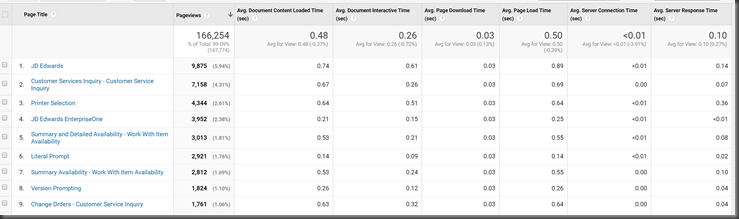
We are also able to drill down into some very detailed numbers on where performance problems might be – slowest screens, apps, regions, servers or users.
image

Sunday, 3 June 2018

9.2, OSA and output management

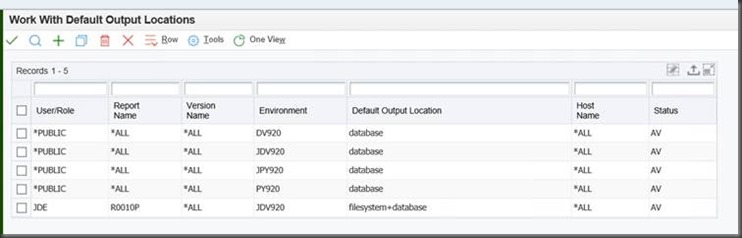
OSA’s do work in 9.2, but you need to activate filesystem output.

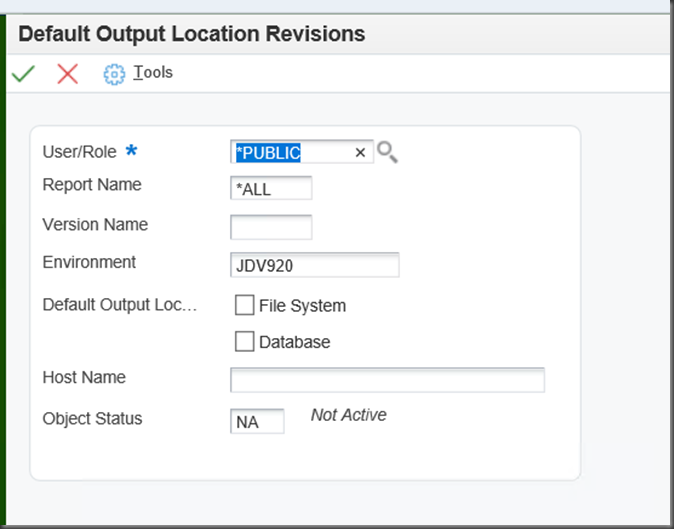
You need to activate your report in P98617 to ensure that filesystem output is enabled

clip_image002

So then you can add individual entries

image

Once you have done this, all of the standard OSA functionality is going to work!  YAY!


I did try and leave the PDF / CSV in the database, but the only function I could find to crab it was not exported to the server:

  JDEGetPDFFile(hUser,
             pOSAReportInfo->szHostName,
             pOSAReportInfo->ulJobNum,
             (BYTE *)szLocalFileName,
             &eRetCode);

So, don’t bother trying that.  It’s exported to the client jdekrnl.lib – but not the server.

This might seem cryptic to most people, but if you’ve programmed OSA’s before (they are SOOOO RAD!!!), then this is good info.

Remember that an OSA can be triggered after a UBE and can do things with the output – perfect for emailing and printing automatically.  I have one that turns on logging, that is cool too!

Monday, 14 May 2018

Reduce your technical debt–embrace User Defined Objects

I’ve done a number of posts on this topic, but we all should be looking toward configuration not code to personalise our JD Edwards environment.  Training for end users and developers must be on the new UDO’s that allow us to modify and personalise our environments based upon config.

For instance, Personalize forms allow you to:

  • Modify field labels
  • Hide, resize, and reposition fields and controls
  • Grid guidelines to help with alignment when moving field (TR 9.2.1.2 and up)
  • Ability to move controls using arrow keys for further refining the alignment (TR 9.2.1.2 and up)
  • Ability to rename tab pages and group boxes (TR 9.2.1.2 and up)
  • Ability to edit the tab sequence (TR 9.2.1.2 and up)
  • Cut and paste controls from one tab page to another (TR9.2.1.2 and up)
  • Ability to mark a field as required (TR9.2.1.2 and up)
  • Personalization of Menu Exits (TR 9.2.2.4 and up)
  • Use the personalize exits link to personalize the Form, Row and Report exits (TR 9.2.2.4 and up)

That is a shed load of functionality and would allow you to retire modifications.

The new form extensions, which allow your to do the following changes

  1. Adding Business view Columns to the header or the grid of a form.
  2. Remove Business view Columns from a header of grid of a form.
  3. Resize Form Header and Grid Areas
  4. Resize Business view columns
  5. Repositioning Business View Columns
  6. Setting filter criteria

Each one of these UDO’s (and security) can be used to lower your technical debt and bring you closer to Continuous Delivery for your users.

CodesDescription 01
CAFE1Composite App Framework
COMPOSITEComposite Page
DATABROWSEData Browser
E1PAGEEnterpriseOne Pages
FORMATGrid Format
FORMEXTNSForm Extensions
IMAGEImage
NTFNotification
ONEVIEWOne View Reports
ORCHOrchestrations
PERSFORMPersonal Forms
QUERYQuery
RECORDERProcess Recorder
RULERule
SCHEDULESchedule
SEARCHEnterpriseOne Search
SREQService Requests
TASKSEARCHTask Search
WATCHLISTOne View Watchlist
WLSTWhitelist
XREFCross Reference

My recommendations to you is to understand all of these UDO’s intimately so that if you are retrofitting or thinking about modifications – you can implement them much more efficiently and allow the business to consume change at a great pace.

Tuesday, 8 May 2018

using swagger hub to document your orchestrations

I recently did a post on how you can use orchestration discovery, which is a nice way to get orchestration definitions from JDE.

Recently swaggerhub released the ability to create swagger definition - well at least a template from a REST call.  So, of course I decided to see what it would do with an orchestration.

https://inspector.swagger.io/builder/builder is the site you can use to call your orchestration and get a nice swagger definition of the API.

Of course, nothing is free.If you want to export this definition to swagger, you need to make it public or your need to pay for a subscription.  I decided to risk it, but it also seems that swagger leaves the entire request (including username and password) in the template - so you might want to get in there a remove it.

The other problem I found with swaggerhub (GDPR does not exist there?) is that I cannot seem to delete the definition.

I end up with:

swagger: '2.0'info:  description: defaultDescription  version: '0.1'  title: defaultTitlepaths:  /orchestrator/20180327_AddAddressBook:    post:      consumes:        - application/json      produces:        - text/html      parameters:        - in: body          name: body          required: false          schema:            $ref: '#/definitions/Model0'          x-examples:            application/json: |-              {                  "username":"SHANNONM",                  "password":"",                "inputs" : [ {                  "name" : "inputAddressDescription",                  "value" : "Shannon Moire"                }, {                  "name" : "inputAddressType",                  "value" : "E"                }, {                  "name" : "inputLongAddressNumber",                  "value" : "45674564551"                } ]              }      responses:        '200':          description: Definition generated from Swagger Inspectordefinitions:  Model0:    properties:      username:        type: string      password:        type: string      inputs:        type: array        items:          $ref: '#/definitions/Inputs'  Inputs:    properties:      name:        type: string      value:        type: string

As my definition.


It's not perfect, as the key:value pairs for the parameters mean something in JDE, so there might be some massage required - but a great start to creating swagger defs for orchestrations!

If you want to take a look at my definition, you can do so here:

We can all hope for a better described and easier way of enterprise real time integration!

Monday, 30 April 2018

change IP address of weblogic server… don’t forget the adminserver cache

There are a heap of instructions of what you need to change if you change the IP address of your weblogic server, but I find they are not complete.  Google it and use oracle support.  The classic sections are:


For the Administration Server and Managed Servers:

For Node Manager:

  • Modify the IP Address in the WebLogic Server Administration Console, in Home >Summary of Machines > Configuration > Node Manager;
  • Modify occurrences of the IP Address in the nodemanager.properties


It’s easy to grep around for the ADMIN_HOST through the start scripts and the nodemanager.properties files, but this will not fix things.  For example, look at this ps output.

Classic example:  You can see that the management.server is listed as http://10.250.252.190:7001 , yet the ip address of the server is a new and improved 10.255.252.201

[root@northstar ~]# ps -ef |grep java |grep 9085
oracle    2162  2105  0 12:47 ?        00:01:09 /usr/java/jdk1.7.0_99/bin/java -server -Xms256m -Xmx512m -XX:MaxPermSize=256m -Dweblogic.Name=NORTHSTAR_HTML_9085 -Djava.security.policy=/u01/Oracle_Home/wlserver/server/lib/weblogic.policy -Dweblogic.ProductionModeEnabled=true -Dweblogic.system.BootIdentityFile=/u01/Oracle_Home/user_projects/domains/e1apps/servers/NORTHSTAR_HTML_9085/data/nodemanager/boot.properties -Dweblogic.nodemanager.ServiceEnabled=true -Dweblogic.nmservice.RotationEnabled=true -Dweblogic.security.SSL.ignoreHostnameVerification=false -Dweblogic.ReverseDNSAllowed=false -XX:MaxPermSize=256m -Dweblogic.wsee.wstx.wsat.deployed=false -Xms2048m -Xmx2048m -Dweblogic.security.SSL.ProtocolVersion=TLSv1.2 -Duser.timezone=Pacific/Auckland -Djava.endorsed.dirs=/usr/java/jdk1.7.0_99/jre/lib/endorsed:/u01/Oracle_Home/wlserver/../oracle_common/modules/endorsed -da -Dwls.home=/u01/Oracle_Home/wlserver/server -Dweblogic.home=/u01/Oracle_Home/wlserver/server -Dweblogic.management.server=
http://10.250.252.190:7001 -Dweblogic.utils.cmm.lowertier.ServiceDisabled=true weblogic.Server

[root@northstar ~]# ifconfig
eth0: flags=4163<UP,BROADCAST,RUNNING,MULTICAST>  mtu 1500
         inet 10.255.252.201  netmask 255.255.255.0  broadcast 10.255.252.255
         inet6 fe80::216:3eff:fe1a:15c3  prefixlen 64  scopeid 0x20<link>
         ether 00:16:3e:1a:15:c3  txqueuelen 1000  (Ethernet)
         RX packets 142041  bytes 12104966 (11.5 MiB)
         RX errors 0  dropped 0  overruns 0  frame 0
         TX packets 38313  bytes 8723699 (8.3 MiB)
         TX errors 0  dropped 0 overruns 0  carrier 0  collisions 0

When I start this server with commandline on Linux, it starts, but does not register with SM and cannot login with a connection error.

[root@northstar default]# pwd
/u01/Oracle_Home/user_projects/domains/e1apps/servers/AdminServer/data/store/default

-rw-r-----. 1 oracle oracle 1049088 Apr 30 12:49 _WLS_ADMINSERVER000000.DAT

The file above in the DIR above, as the incorrect server address in it’s config:


[root@northstar default]# grep 10. _WLS_ADMINSERVER000000.DAT
Binary file _WLS_ADMINSERVER000000.DAT matches

It’s a binary match – this needs to be removed.

stop admin server:

delete it

goto

/u01/Oracle_Home/user_projects/domains/e1apps/servers/AdminServer/data/nodemanager
[oracle@northstar nodemanager]$ ls -l
total 16
-rw-r-----. 1 oracle oracle  13 Apr 30 21:15 AdminServer.state
-rw-r-----. 1 oracle oracle  27 Apr 30 12:47 AdminServer.url
-rw-r-----. 1 oracle oracle 174 Sep 22  2017 boot.properties
-rw-r-----. 1 oracle oracle 432 Sep 22  2017 startup.properties

change AdminServer.url

NOW:

startManagedWebLogic.sh

ps –ef |grep java

you’ll see that your process now has the correct management server defined (FQDN for the machine – YAY!)


oracle    3709  3653 53 21:22 pts/0    00:00:24 /usr/java/jdk1.7.0_99/bin/java -server -Xms256m -Xmx512m -XX:MaxPermSize=256m -Dweblogic.Name=NORTHSTAR_HTML_9085 -Djava.security.policy=/u01/Oracle_Home/wlserver/server/lib/weblogic.policy -Dweblogic.ProductionModeEnabled=true -Dweblogic.security.SSL.trustedCAKeyStore=/u01/Oracle_Home/wlserver/server/lib/cacerts -Djava.endorsed.dirs=/usr/java/jdk1.7.0_99/jre/lib/endorsed:/u01/Oracle_Home/wlserver/../oracle_common/modules/endorsed -da -Dwls.home=/u01/Oracle_Home/wlserver/server -Dweblogic.home=/u01/Oracle_Home/wlserver/server -Dweblogic.management.server=http://northstar.xxx:7001 -Dweblogic.utils.cmm.lowertier.ServiceDisabled=true weblogic.Server
oracle    3829  2836  0 21:23 pts/0    00:00:00 grep --color=auto java
[oracle@northstar default]$


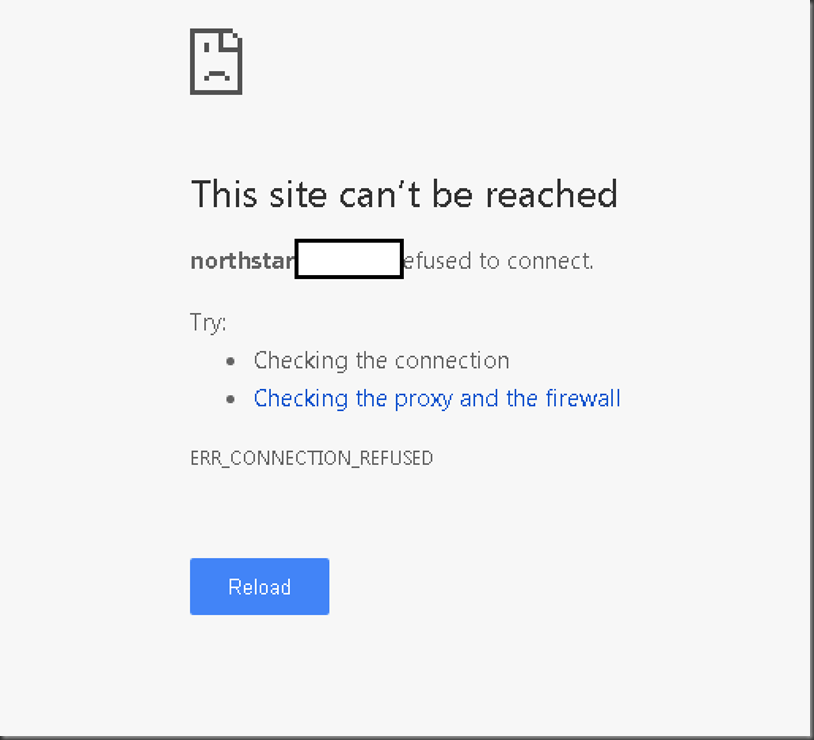
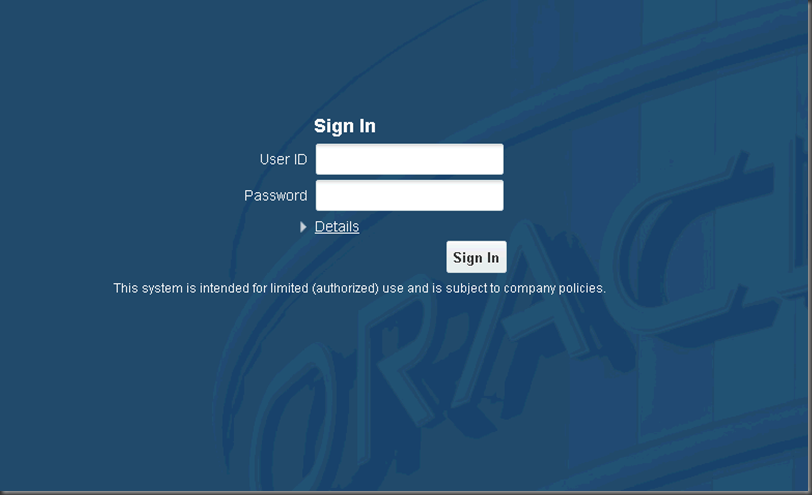
Following my instructions – you’ll delete the DAT file and change the ADminServer.url file and start the AdminServer again – you’ll find everything works.

Instead of

image

I get

image


Thursday, 26 April 2018

Service discovery and tools release 9.2.2.4

Okay, service discovery is cool and easy and might help your describe your services to someone.

Problem is that this could be much better with something like swagger – but you gotta start somewhere – hey!

you need to do a get from your AIS server with batch authentication

https://f5iot.mye1.com/jderest/discover

That is with a header something like:

Authorization: Basic U0hBTk5PTk06YWJjMTIz

Note that this was generated with a temp password, so nothing decent in that.

note that this is just username : password in base64

So, all you need to do it goto http://decodebase64.com/

type in my auth token above and see

image

Too easy, it’s already changed.

Here is a video showing what you can do

Note that a nice thing is getting the array syntax that I described the other day

    "name" : "20180424_CallSendMessage",     "omwObjectName" : "ORC_1804240002CUST",     "udoGroup" : "Personal",     "description" : "Confirm it",     "inputFormat" : "JDE Standard",     "version" : "v2",     "inputs" : [ {       "name" : "SingleInputString",       "type" : "String"     }, {       "name" : "ColourList",       "type" : "Array",       "array" : [ {         "name" : "Colour",         "type" : "String"       } ]     } ],

Tuesday, 24 April 2018

JD Edwards Orchestration using iterate over for orchestration input

I must admit, I found this one a little frustrating, but good to get it out of the way.

This is solving the problem of the parent / child orchestration (parent child being defined within the input document).

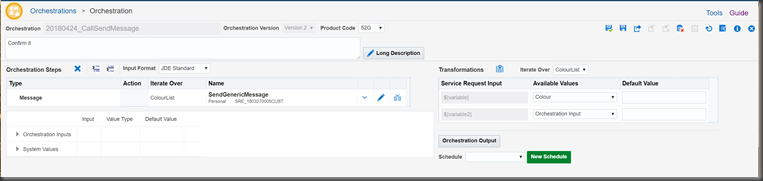
I created a very simple orchestration:

image

Basically iterate over my array of ColourList (sorry USA, this is how well spell it down under), for each of the elements in the colour list, send me an email.

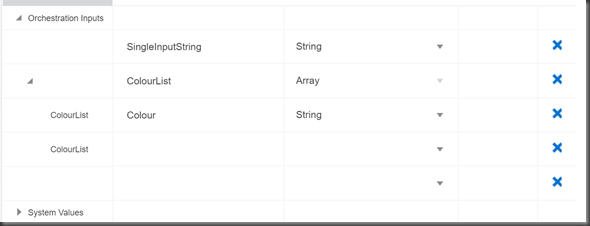
My array is currently true to the word, an array – but it’s not an array of structures yet.

image

A single dimension Array with Colour as the only element.

Therefore, my orchestration should take the input and send me an email with the title of the colour – nice and easy…  For every colour that I list.

But, the real question is – how do I form the input JSON for this function? 

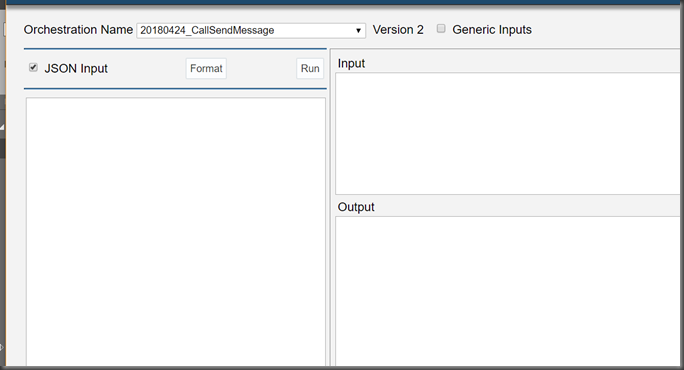
I need to use JSON, as the orchestrator client (below) does not have the tooling to be able to load up arrays, you can see that it’s very one dimensional for the parameters of a function.

image

You need to tick the JSON Input box to get this screen:

image

A little cheat if you have not done it, is fill out the parameters and run the function, you get the JSON in the input box if you’re making a valid call:


image

You have the super basic 1D inputs, now you make this parent/child.  Copy that input and paste it into your favourite JSON editor – you are going to need it.

Below is a template multiple level (parent child input that works for my function)

This is going to save quite a bit of heart ache

{
   "inputs" : [ {
     "name" : "SingleInputString",
     "value" : "Hello"
   }],
   "detailInputs": [{
    "name": "ColourList",
    "repeatingInputs": [
      {
        "inputs": [
          {"name":"Colour","value":"Pink" }
        ]
      },
      {
        "inputs": [
          {"name":"Colour" ,"value": "Red" }
         ]
      }
   ] }
   ]
}

There is a lot of verbage here and a lot of terms that need to be in the JSON, otherwise it will not iterate, trust me.  I tried many combinations.

You need to ensure that you use the object “repeatingInputs” – casE sensitive.  You need to also include inputs array

To Get 4 emails, I post the following JSON

{
   "inputs" : [ {
     "name" : "SingleInputString",
     "value" : "Hello"
   } ],
   "detailInputs" : [ {
     "name" : "ColourList",
     "repeatingInputs" : [ {
       "inputs" : [ {
         "name" : "Colour",
         "value" : "Pink"
       } ]
     }, {
       "inputs" : [ {
         "name" : "Colour",
         "value" : "Red"
       } ]
     }, {
       "inputs" : [ {
         "name" : "Colour",
         "value" : "Blue"
       } ]
     }, {
       "inputs" : [ {
         "name" : "Colour",
         "value" : "Turquoise"
       } ]
     } ]
   } ]
}

Nice!  Here is my inbox.

image


I’ve been using an online JSON editor, because the orchestration client (bless it) does not help my crappy syntax.  This is great!

image

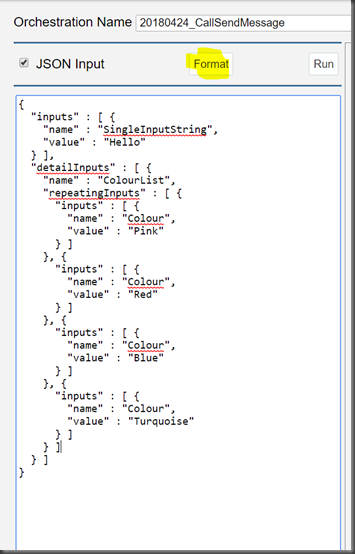
You know that you’ve made a mistake in JDE, if you hit for format button and it bombs – your JSON is bad

image

If it’s good, it’ll look nicely formatted, but this does not mean that the document is formed correctly.  You could not be using key value pairs, and it’ll still format, just nothing will work on the AIS server!

All you need to do is follow my basic template above and all will work.  Here is a copy of my orchestration too – just in case you want to test the document yourself.

Note that the service request is hard coded to send an email to me, so you might want to change that.

You can grab my code here: https://drive.google.com/file/d/10KBi7XNuqnSIYwzgb921lTqvDj0SKTYw/view?usp=sharing