Exciting
This is a pretty exciting enhancement, it’s exciting for a number of reasons. Although to be honest, technically – it’s not that exciting. It’s the change of thinking that is truly exciting. Can I write the word exciting anymore, let’s see.
Why do I say that technically it’s not exciting, well most of the cool stuff has already been released in AIS, so the generic ability to call E1 functionality via rest based calls is totally awesome. This must be the way you choose to integrate anything with JD Edwards moving forward. It seems to be lighter and easier to develop in than BSSV, error handling is better and more forgiving, especially for a human based interface (mobile, website etc). Don’t get me wrong, BSSV has it’s place – but it’s no longer that cool.
The technology that is doing the rules based filtering is nice, but fairly rudimentary at this stage, lets wait for some graphical tool to assist us. Something nice with flows and drag and drop parameters that’d be nice. Don’t stop with the flow and the rules either, how about making AIS development graphical – come on – there is a challenge. I’d like some nice tool to drop 3 XML documents into the associated directories and allow me to call them! True, I’m getting old. Although let’s be honest – who calls writing a well formed XML document “cutting code”?
Change of thinking, business opportunity:
So this is where I think that the true value is, I don’t think that you need to look too hard for a use case either – especially if you take inputs from anything and enter them into JD Edwards,
JD Edwards is not going to be a great data warehouse, it’s not going to store 100000’s of rows of asset location data well, of course it will – but it’ll slow everything else down. You need to design your inputs so that they are meaningful in JD Edwards. Don’t misinterpret what I’m saying, SAVE ALL DATA – you’ll never know what it’s actually worth. I’m just saying that saving it into your production JD Edwards database might not not be the most efficient place. Save the triggering event, raise the work order when the temperature device reads too high…. But don’t save the normal 1 minute trend data for the last year in JD Edwards. Save this in a data warehouse and show it with CAFE1 if you really need to see it in JD Edwards. Choose the right place for your data.
Remember, IOT is going to create a lot of data… More sensors, more data. keep your data and save your data for a rainy and strategic day for the use case that you cannot visualise today.
I think some fantastic opportunities for this is:
- weighbridge interfaces
- quality readings from products – steel / food etc
- RFID for shipping and identification
- anything PLC related
- temperature, moisture (agri business), location, angle, speed, noise,
I think there are fantastic opportunities with CAM and with HS&E, this data could be vital when trying to predict incidents that cause harm and report over them. Remember you’ll get true data from IOT, no mistakes, always entered on time – accurately.
We’re prototyping some IOT for clients at the moment, if you think that you’ve got a winning use case – we have a winning team that might be able to implement the solution for you at the right price.
Here are a couple of learning's from my recent adventures in IOT.
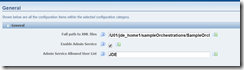
The general section of your AIS server needs to point to quite a specific directory – this one:
/U01/jde_home1/sampleOrchestrations/SampleOrchestrations/JDE_IOT_Orchestrator_XML
For me, it’s above. But I want to give you some context. This is from downloading the ORCHESTRATION SAMPLES file from MOS

Note the one that is 0.03MB is the one that you want.
Lay this bad boy out on your AIS server. rename the par.zip, or just unzip the par… Note that you might have to yum install unzip
You need to make sure that you point this AIS configuration about to the right DIR, it as the following folders in it:
CrossReferences
Orchestrations
Rules
ServiceRequests
WhiteLists
Okay, so you have the right DIR.
Note that if like me you get the following error when you try and log into the orchestrator client; (Authentication error)
http://e1webv3:9221/jderest/client
You turn on all logging and get the following in the server logs for the AIS server:
09 Nov 2015 12:36:19,224[DEBUG][AIS]AISClientServlet session Exception
http://e1webv3:9221 com.oracle.e1.aisclient.JDERestServiceException: 401 Verifiy WLS Server Basic Authorization Header configuration in domain config.xml, enforce-valid-basic-auth-credentials must be false:
09 Nov 2015 12:41:18,581[DEBUG][AIS]AISClientServlet public
09 Nov 2015 12:41:18,582[DEBUG][AIS]AISClientServlet service method POST
09 Nov 2015 12:41:18,582[DEBUG][AIS]AISClientServlet doPost
09 Nov 2015 12:41:18,583[DEBUG][AIS]AISClientServlet params JDE-JPY920-*ALL-e1webv3:9221-Z1bp4u58flboTpjN-lD1DbZ3t2BH-UH2Li-UnQBYnIzxFhqr2A9P!-488571965
09 Nov 2015 12:41:18,584[DEBUG][AIS]AISClientServlet doPost aisServerhttp://e1webv3:9221
09 Nov 2015 12:41:18,584[DEBUG][AIS]AISClientServlet login path
09 Nov 2015 12:41:18,591[DEBUG][AIS]E1ResUtils getAISVersion buffer
09 Nov 2015 12:41:18,592[DEBUG][AIS]E1ResUtils getAISVersion in java.io.BufferedReader@6e293511
09 Nov 2015 12:41:18,593[DEBUG][AIS]E1ResUtils getAISVersion inputLine EnterpriseOne
09 Nov 2015 12:41:18,619[DEBUG][AIS]Successfully registered the runtime_config Runtime Metric for com.oracle.e1.jdemf.DefaultConfig@2a6547af Using null
09 Nov 2015 12:41:18,619[DEBUG][AIS]Successfully registered runtime_config Mbean com.oracle.e1.jdemf.DefaultConfig@2a6547af
09 Nov 2015 12:41:18,621[DEBUG][AIS]Required Capability List IN: null
You’ll find that this will make your eye’s roll
https://support.oracle.com/epmos/faces/DocContentDisplay?id=2040956.1Note that the fix is to go to your config.xml for the domain that the AIS server is installed in:
/U01/Oracle/Middleware/user_projects/domains/E1_Apps/config
And edit the config.xml file – probably make a backup (or not if you are feeling like rebel)
  <name>E1_Apps</name>
  <domain-version>12.1.3.0.0</domain-version>
  <security-configuration>
    <name>E1_Apps</name>
    <enforce-valid-basic-auth-credentials>false</enforce-valid-basic-auth-credentials>
    <realm>
See above, look for the realm entry and paste above that for your domain. I did it in the wrong place initially and nothing worked. Restart the AIS server instance from SM and you’ll be able to login.

Cool! We are in:
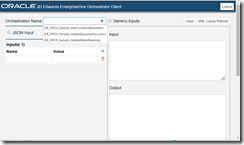
Like I said a fairly simple interface for choosing an existing item from the list: (or dir)
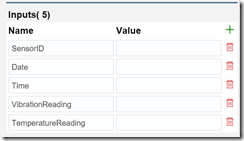
Be able to enter the inputs
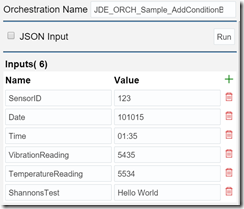
Add some values and hit go, you’ll see some cools things:
{
  "inputs" : [ {
    "name" : "SensorID",
    "value" : "123"
  }, {
    "name" : "Date",
    "value" : "101015"
  }, {
    "name" : "Time",
    "value" : "01:35"
  }, {
    "name" : "VibrationReading",
    "value" : "5435"
  }, {
    "name" : "TemperatureReading",
    "value" : "5534"
  }, {
    "name" : "ShannonsTest",
    "value" : "Hello World"
  } ]
}
Nice, json input format, which we can test
And, even nicer, using chrome debug tools, you can get a cURL command
curl "http://e1webv3:9221/jderest/clientservice/orchestrator" -H "Origin: http://e1webv3:9221" -H "Accept-Encoding: gzip, deflate" -H "Accept-Language: en-US,en;q=0.8" -H "User-Agent: Mozilla/5.0 (Windows NT 10.0; WOW64) AppleWebKit/537.36 (KHTML, like Gecko) Chrome/46.0.2490.80 Safari/537.36" -H "Content-Type: application/x-www-form-urlencoded; charset=UTF-8" -H "Accept: */*" -H "Referer: http://e1webv3:9221/jderest/client/orchestrator.html" -H "Cookie: JSESSIONID=b5D14vor1wgZXx7MrUXPu4xnC_e_rxMQE0fyaAI32wA9U7To9wLj!1811286266; SMCONSOLE_SSID=jYj12SvLtf_HhobsFJGGXn2X-4ZdGG27K2O-3rI6tpxVkhkAb8-p!-1147834967" -H "Connection: keep-alive" --data "orchname=JDE_ORCH_Sample_AddConditionBasedAlert&generic=false&useJson=true&jsonString={"^
"  ""inputs"" : [ {"^
"    ""name"" : ""SensorID"","^
"    ""value"" : ""123"""^
"  }, {"^
"    ""name"" : ""Date"","^
"    ""value"" : ""101015"""^
"  }, {"^
"    ""name"" : ""Time"","^
"    ""value"" : ""01:35"""^
"  }, {"^
"    ""name"" : ""VibrationReading"","^
"    ""value"" : ""5435"""^
"  }, {"^
"    ""name"" : ""TemperatureReading"","^
"    ""value"" : ""5534"""^
"  }, {"^
"    ""name"" : ""ShannonsTest"","^
"    ""value"" : ""Hello World"""^
"  } ]"^
"}&name_0=SensorID&value_0=123&name_1=Date&value_1=101015&name_2=Time&value_2=01:35&name_3=VibrationReading&value_3=5435&name_4=TemperatureReading&value_4=5534&name_5=ShannonsTest&value_5=Hello World" --compressed
Of course, this won’t help you – coz the cookie will be dead by the time I post this and this server in not on the internet, but you get the gist of what is being done.
What do you need to do to get this working?
<?xml version="1.0" encoding="UTF-8" ?>
<Orchestration xmlns:xsi="http://www.w3.org/2001/XMLSchema-instance" xsi:noNamespaceSchemaLocation="JDE_Orchestration.xsd">
    <inputTypes>
        <inputTypes type="String">
            <name>SensorID</name>
        </inputTypes>
        <inputTypes type="Date" dateFormat="Milliseconds">
            <name>Date</name>
        </inputTypes>
        <inputTypes type="String">
            <name>Time</name>
        </inputTypes>
        <inputTypes type="Numeric">
            <name>VibrationReading</name>
        </inputTypes>
        <inputTypes type="Numeric">
            <name>TemperatureReading</name>
        </inputTypes>
    </inputTypes>
    <orchestrationSteps>
        <orchestrationSteps type="CrossReference">
            <name>JDE_XREF_Sample_SensorLocation</name>
        </orchestrationSteps>
        <orchestrationSteps type="CrossReference">
            <name>JDE_XREF_Sample_AlertNotificationRecipients</name>
        </orchestrationSteps>
        <orchestrationSteps type="Rule">
            <name>JDE_RULE_Sample_CBMAlarm_1</name>
            <trueActions>
                <orchestrationSteps type="ServiceRequest">
                    <name>JDE_SREQ_Sample_AddCBAlert_Alarm</name>
                </orchestrationSteps>
            </trueActions>
            <falseActions>
                <orchestrationSteps type="Rule">
                    <name>JDE_RULE_Sample_CBMAlarm_2</name>
                    <trueActions>
                        <orchestrationSteps type="ServiceRequest">
                            <name>JDE_SREQ_Sample_AddCBAlert_Alarm</name>
                        </orchestrationSteps>
                    </trueActions>
                    <falseActions>
                        <orchestrationSteps type="Rule">
                            <name>JDE_RULE_Sample_CBMAlarm_3</name>
                            <trueActions>
                                <orchestrationSteps type="ServiceRequest">
                                    <name>JDE_SREQ_Sample_AddCBAlert_Alarm</name>
                                </orchestrationSteps>
                            </trueActions>
                            <falseActions>
                                <orchestrationSteps type="Rule">
                                    <name>JDE_RULE_Sample_CBMWarning</name>
                                    <trueActions>
                                        <orchestrationSteps type="ServiceRequest">
                                            <name>JDE_SREQ_Sample_AddCBAlert_Warning</name>
                                        </orchestrationSteps>
                                    </trueActions>
                                </orchestrationSteps>
                            </falseActions>
                        </orchestrationSteps>
                    </falseActions>
                </orchestrationSteps>
            </falseActions>
        </orchestrationSteps>
    </orchestrationSteps>
</Orchestration>
So we can see from the above document, how the various components are being called (cross reference etc)
P952000 will show you the maps that can be maintained in JDE for cross reference etc:
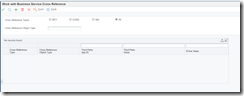
Note that I get the following error, because I need to load the cross reference data into my F952000 tables
{
  "exception" : "java.lang.Exception",
  "timeStamp" : "2015-11-11:20.59.05",
  "message" : "Orchestration Aborted: Cross Reference Failure"
}


