| JDEdwards | OneWorld | EnterpriseOne Application Releases | |||||
|---|---|---|---|---|---|---|---|
| Application Release | XE/ERP8 | 8.10 | 8.11 | 8.11 SP1 | 8.12 | 9.0 | 9.1 |
| Compatible Tools Release | SP23/24 | X | X | X | X | X | X |
| 8.93 | X | X | X | X | X | ||
| 8.94 | 8.94 | X | X | X | X | ||
| 8.95 | 8.95 | 8.95 | X | X | X | ||
| 8.9 | 8.96 | 8.96 | 8.96 | X | X | ||
| 8.97 | 8.97 | 8.97 | 8.97 | X | X | ||
| 8.98 | 8.98 | 8.98 | 8.98 | 8.98 | X | ||
| 8.98.1 | 8.98.1 | 8.98.1 | 8.98.1 | 8.98.1 | X | ||
| X | 8.98.2 | 8.98.2 | 8.98.2 | 8.98.2 | X | ||
| X | 8.98.3 | 8.98.3 | 8.98.3 | 8.98.3 | X | ||
| X | 8.98.4 (8.98.4.11 or earlier) | 8.98.4 (8.98.4.11 or earlier) | 8.98.4 (8.98.4.14 Terminal Release) | 8.98.4 (8.98.4.14 Terminal Release) | X | ||
| X | X | X | X | 9.1.0.0 | 9.1.0.0 | ||
| X | X | X | X | 9.1.2.0 | 9.1.2.0 | ||
| X | X | X | X | 9.1.3.0 | 9.1.3.0 | ||
| X | X | X | X | 9.1.4.0 | 9.1.4.0 | ||
| X | X | X | X | 9.1.5.0 | 9.1.5.0 | ||
Friday, 13 February 2015
tools release compatibility matrix
This is a really important table that you should all know.


Wednesday, 11 February 2015
writing JD Edwards mobile apps? STOP!
There has been a massive change in mobile app development over the last couple of tools releases. The latest modifications are fantastic.
Start your learning journey here:
You’ll need support.oracle.com credentials. The documentation is awesome and so are the examples. They are making it very easy to use tested and existing application functionality in the mobile space.
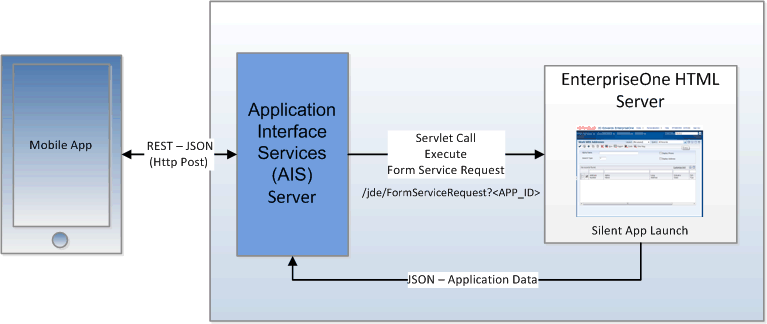
http://docs.oracle.com/cd/E24705_01/doc.91/e56635/img/jde_e1_mobile_arch.gif

This is probably some sort of infringement, but it’s for the greater good. You can see now that there is an AIS server (J2EE container) which is the gateway between the mobile device and the application data and logic via the “FormServiceRequest” method available from the native E1 web installation. Cool!
So essentially you are turning an E1 form into a class, with standard CRUD type functionality.
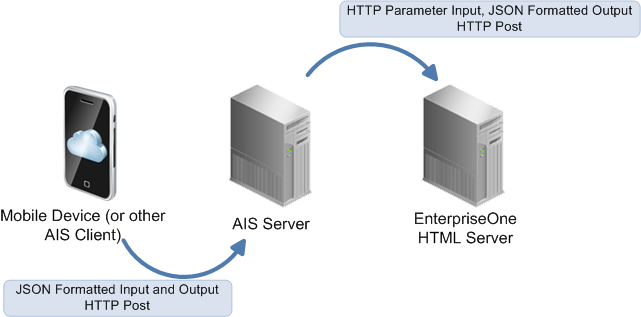
http://docs.oracle.com/cd/E24705_01/doc.91/e56635/img/json_in_and_out.png

So it seems to be that this is a great way of using what has been written in JD Edwards and using your existing development skills to be able to fairly quickly enable mobile interactivity with JD Edwards.
You’ll need to skill up with JDeveloper – but that’s easy enough. A Number of helper classes have been provided for you to assist this journey.
Of course error handling is going to be fun (it always is). Media objects are going to be fun, but they always are aren't they?
Monday, 9 February 2015
A long story for a couple of good tips
You can probably tell from my last post (not the last post) that I’m working on making a unicode conversion go a lot faster. There are heaps of ways of doing this, I’m lucky enough to be working on a large oracle site with EE and heaps of CPU’s. I’m able to give the thing a good thrashing too:
So at the end of the day I need to write 2 different bits of code, 1 to convert all of the huge tables manually, and another to convert the rest of the table with the standard OWTBLCONV. That is the name of the procedure that oracle gives you to do the conversions for you. You can just look at this in SQLDeveloper and see what it does, it’s pretty cool.
Anyway, so I’m in unix land and I need a script that will go through all of the tables with CHAR fields and convert them. Okay, lets get a list:
select  table_name from all_tables t1 where
exists (select 1 from all_tab_columns t2
where t2.data_type = 'CHAR'
and t1.table_name = t2.table_name
and t1.owner = t2.owner)
and t1.owner = 'PRODDTA' ;
Right, that was easy, now which are the big tables again… Oh yeah, that’s easy:
select segment_name, sum(bytes) from dba_segments where owner = 'PRODDTA' group by segment_name order by 2 desc;
Right we are getting somewhere. Now there are 4000 tables (approx) in proddta that need to be unicode, so I have a file in unix with 4000 lines. I want to make my script multi-threaded, so all I do is use the most awesomely awesome command – split:
split -l 500 tables.list parallel_table
So this gives me as many files as I need, starting with “parallel_table” out of my list of tables “tables.list”. Yes, that easy:
-rw-r--r--    1 moirs    staff          4138 Feb 09 18:42 parallel_tableaa
-rw-r--r--    1 moirs    staff          4139 Feb 09 18:42 parallel_tableab
-rw-r--r--    1 moirs    staff          4079 Feb 09 18:42 parallel_tableac
-rw-r--r--    1 moirs    staff          3688 Feb 09 18:42 parallel_tablead
-rw-r--r--    1 moirs    staff          3619 Feb 09 18:42 parallel_tableae
-rw-r--r--    1 moirs    staff          3640 Feb 09 18:42 parallel_tableaf
-rw-r--r--    1 moirs    staff          3784 Feb 09 18:42 parallel_tableag
-rw-r--r--    1 moirs    staff          3189 Feb 09 18:42 parallel_tableah
That is so Rad!
I then have a script that I call:
#!/usr/bin/ksh
#mkdir ~/uniconvlogs
if [ $# -ne 1 ]
  then
    echo "USAGE $0 <input file containing list of tables>"
    return 1
fi
fileinput=$1
if [ ! -f $fileinput ]
  then
    echo "ERROR:  File $1 does not exist"
    return 1
fi
for filename in `cat $fileinput`
  do
    echo processing $filename
    echo "spool /home/moirs/uniconvlogs/$filename.log" >~/uniconvlogs/$filename.sql
    echo "set echo on" >> ~/uniconvlogs/$filename.sql
    echo "set feedback on" >>~/uniconvlogs/$filename.sql
    echo "set timing on" >>~/uniconvlogs/$filename.sql
    echo "set pagesize 8000" >>~/uniconvlogs/$filename.sql
    echo "set linesize 8000" >>~/uniconvlogs/$filename.sql
    echo "set trimspool on" >>~/uniconvlogs/$filename.sql
    echo "alter session force parallel DDL PARALLEL 8;" >>~/uniconvlogs/$filename.sql
    echo "alter session force parallel DML PARALLEL 8;" >>~/uniconvlogs/$filename.sql
    echo "alter session force parallel QUERY PARALLEL 8;" >>~/uniconvlogs/$filename.sql

    echo "select to_char(sysdate,'HH24:MI:SS') , to_char(sysdate,'YYY MM DD') from dual;" >>~/uniconvlogs/$filename.sql
    echo "Call ProdDta.OWTBLCONV('PRODDTA', 'J@ck@ss','PRODDTA','PRODDTA', '$filename',0,0);"  >>~/uniconvlogs/$filename.sql
    echo "spool off" >>~/uniconvlogs/$filename.sql
    echo "exit" >>~/uniconvlogs/$filename.sql

    sqlplus proddta/J@ck@ss@sp2jde @/home/moirs/uniconvlogs/$filename.sql

done
And a script that does the multi-threading:
#!/usr/bin/ksh
for tablelist in `ls ~/parallel_tablea*`
  do
    convertTables.ksh $tablelist &
done
So now I have a complete suite of rapid conversions with 6 threads. This is blasting through the workload.
I’ve already taken out the LARGE tables that I’m doing manually, they are done with a script like:
column filename new_val filename ;
select './UnicodeConv/F0101_unicode_conversion_' || to_char(sysdate, 'yyyymmdd' ) ||'.log' filename from dual;
spool &filename

set echo on
set feedback on
set timing on
set pagesize 8000
set linesize 8000
set trimspool on
select to_char(sysdate,'HH24:MI:SS') from dual;
select to_char(sysdate,'YYY MM DD') from dual;


alter session force parallel DDL PARALLEL 8;
alter session force parallel DML PARALLEL 8;
alter session force parallel QUERY PARALLEL 8;

alter table proddta.F0101 rename to F0101_NONUNI;
alter table proddta.F0101_NONUNI drop constraint F0101_PK ;

--stupid, but still uses old name for delete.
--although an index could be called mittens, does not need to be called the table name

DROP INDEX PRODDTA.F0101_0;
DROP INDEX PRODDTA.F0101_10;
DROP INDEX PRODDTA.F0101_11;
DROP INDEX PRODDTA.F0101_12;
DROP INDEX PRODDTA.F0101_13;
DROP INDEX PRODDTA.F0101_14;
DROP INDEX PRODDTA.F0101_15;
DROP INDEX PRODDTA.F0101_16;
DROP INDEX PRODDTA.F0101_2;
DROP INDEX PRODDTA.F0101_3;
DROP INDEX PRODDTA.F0101_4;
DROP INDEX PRODDTA.F0101_5;
DROP INDEX PRODDTA.F0101_6;
DROP INDEX PRODDTA.F0101_7;
DROP INDEX PRODDTA.F0101_8;
DROP INDEX PRODDTA.F0101_9;
DROP INDEX PRODDTA.F0101_CUST_IDX01;

 CREATE TABLE "PRODDTA"."F0101"
   (    "ABAN8" NUMBER,
        "ABALKY" NCHAR(20),
        "ABTAX" NCHAR(20),
        "ABALPH" NCHAR(40),
        "ABDC" NCHAR(40),
        "ABMCU" NCHAR(12),
        "ABSIC" NCHAR(10),
        "ABLNGP" NCHAR(2),
        "ABAT1" NCHAR(3),
        "ABCM" NCHAR(2),
        "ABTAXC" NCHAR(1),
        "ABAT2" NCHAR(1),
…
        "ABACTIN" NCHAR(1),
        "ABREVRNG" NCHAR(5),
        "ABSYNCS" NUMBER,
        "ABPERRS" NUMBER,
        "ABCAAD" NUMBER )
  PCTFREE 10 PCTUSED 40 INITRANS 1 MAXTRANS 255
 NOCOMPRESS LOGGING
  STORAGE(INITIAL 65536 NEXT 1048576 MINEXTENTS 1 MAXEXTENTS 2147483645
  PCTINCREASE 0 FREELISTS 1 FREELIST GROUPS 1
  BUFFER_POOL DEFAULT )
  TABLESPACE "PRODDTAT"
  PARALLEL 8 ;

select to_char(sysdate,'HH24:MI:SS') from dual;
select to_char(sysdate,'YYY MM DD') from dual;


  INSERT INTO PRODDTA.F0101 SELECT * FROM PRODDTA.F0101_NONUNI ;
commit ;

select to_char(sysdate,'HH24:MI:SS') from dual;
select to_char(sysdate,'YYY MM DD') from dual;

spool off;
quit;
Friday, 6 February 2015
JD Edwards unicode conversions faster
If you’ve got lost of data you might have got to this post. If you are attempting to go live is some sort of second rate cloud, you might have come to this page. Let me tell you a story and highlight things with some numbers.
Once upon a time there was a table in JD Edwards, let’s call it F03B11 that had 46 million rows. This table took 5.5 hours to convert to unicode using the JD Edwards standard unicode conversion methodology.
A new conversion method got this down to 15 minutes, but what changed? Everything!
Read on for the details:
The initial timings were attained during an upgrade and platform migration to the cloud. This poor client was moving from the stability and performance of their impressively specified p-Series to their no so impressive (at first) cloud provider.
This is an oracle based system, both pSeries and going to cloud.
I guess this turns out to be a bit of a hard core comparison of cloud vs. physical tin that you can touch and also big unix vs x86 and fibre attached SAN vs – who knows what you are getting in the cloud – 100MBs NAS?
But, you are stuck with your hardware. You might choose where you are going to run certain items, but in general this piece if fixed.
What can you change to make the process quicker?
Perhaps something like:
- create table F0911_UNICODE (…. NCHAR NCHAR blah blah)
- drop all F0911 indexes
- alter table proddta.f0911 drop constraint F0911_PK;
- insert into proddta.f0911_UNICODE select * proddta.f0911;
- commit
- create all F0911 indexes
This is instead of using the stored procedure and function that JD Edwards calls.
I’ve seen up to 25% improvement (and more) running this manually on the large tables.
It’s easy to get the unicode definitions of the tables, just generate them against a unicode data source (control tables is handy) and then grab the details from SQLDeveloper.

I generally employee the above for the top 20 tables and use the standard conversions for the others.
As a side note, the data in this 46 million row F03B11 was 42.6GB single single byte mode but 71.5GB in unicode. For this table it was 59% greater.
Thursday, 5 February 2015
The simple blog entries are sometimes the best - awk
I’m tracing through JD Edwards log files and am searching for an IP address that is having connection issues in the jdenet log files. They are easily identifiable by grepping for my problem IP address:
>grep 10.32.8.40 * |more
jde_3680.log: 10054-Error from Host=<10.32.8.40> in recv returned 10054 (WSAECONNRESET): Connection was reset by peer
jde_3680.log: 10054-Error from Host=<10.32.8.40> in recv returned 10054 (WSAECONNRESET): Connection was reset by peer
jde_3680.log: 10054-Error from Host=<10.32.8.40> in recv returned 10054 (WSAECONNRESET): Connection was reset by peer
jde_3680.log: 10054-Error from Host=<10.32.8.40> in recv returned 10054 (WSAECONNRESET): Connection was reset by peer
jde_3680.log: 10054-Error from Host=<10.32.8.40> in recv returned 10054 (WSAECONNRESET): Connection was reset by peer
jde_3680.log: 10054-Error from Host=<10.32.8.40> in recv returned 10054 (WSAECONNRESET): Connection was reset by peer
But I need the timestamp, so I want the previous line in the log file, oh wait – we are on a totally legendary OS like unix or linux and this is massively easy:
>grep -B1 10.32.8.40 * |more
jde_11156.log-11156/11692 MAIN_THREAD Sun Feb 01 01:04:11.728000 NETRCV.C443
jde_11156.log: 10054-Error from Host=<10.32.8.40> in recv returned 10054 (WSAECONNRESET): Connection was reset by peer
--
jde_11156.log-11156/11692 MAIN_THREAD Mon Feb 02 23:00:42.996000 NETRCV.C443
jde_11156.log: 10054-Error from Host=<10.32.8.40> in recv returned 10054 (WSAECONNRESET): Connection was reset by peer
Wow, so now I can start reconciling the timestamps and the errors. Fantastic!
-B num, --before-context=num
Print num lines of leading context before each match. See also the -A and -C options.
Tuesday, 3 February 2015
windows find specific files
I’m using findstr because the find window is complete rubbish, but now I have another issue. I want to list the files I’ve “found” in explorer to copy them to another folder. Ironically I want to zip them up and move them to my Mac so that I can sed and awk the cr@p out of them and get to the bottom of a tricky network problem at a client.
So, I have the list of files in a dos window and I paste them into EXCEL and add some “ OR “ with a basic concatenate function. (& thanks Shae) [=+A4&" OR "]. Then I past then into the explorer find window and prefix it with the ultra intuitive “system.filename:”
The exact syntax for the find multiple and specific files:
system.filename: jde_11156.log OR jde_12268.log OR jde_3680.log OR jde_4296.log OR jde_4516.log OR jde_4596.log OR jde_5384.log OR jde_7776.log OR jde_7896.log OR jde_9220.log OR jde_9772.log OR jde_9980.log
So now, I have a window with all of the files that contains the text I’m searching for without crappo windows find.

Quickly copy and create zip and send to unix and now I can get to work. cygwin do I hear you calling – maybe you are right.
find rage (oh yeah, I’m back)
I know I’ve said it before, but I’m going in again.
I have complete find rage with windows.
findstr /c:”10.32.8.40” finds heaps of files and heaps of instances in the jde log directory.

Find window, searching in file contents – finds nothing.
Don’t EVER rely on windows find to have your back.
Subscribe to:
Posts (Atom)
-
 Why am I still doing this. Fixing fat clients is not a lot of fun. Here is a couple of tips for connecting to the database using NTS and...
 -
Ever wanted to know what that pesky OMW transfer error message code meant, here is the list of errors and what they mean in some meaningful...
-
CK : User Preference Cookies (what is saved in user preferences – Enable Hover Forms etc) GF : Grid Format (added when user adds a fri...