Tuesday, 29 January 2013

Considering an upgrade? What do you put in the business case?

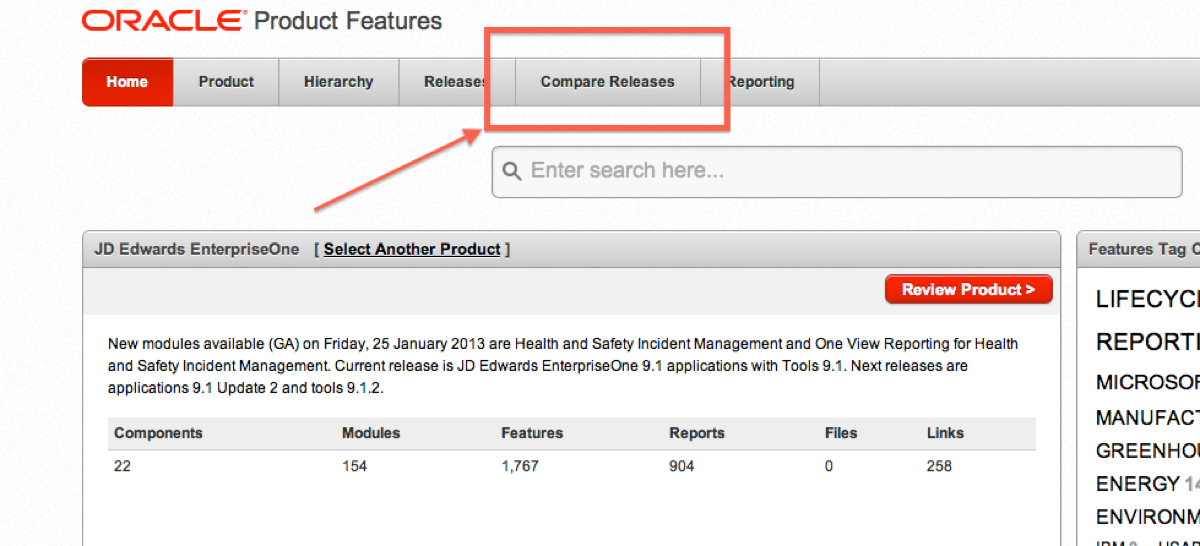
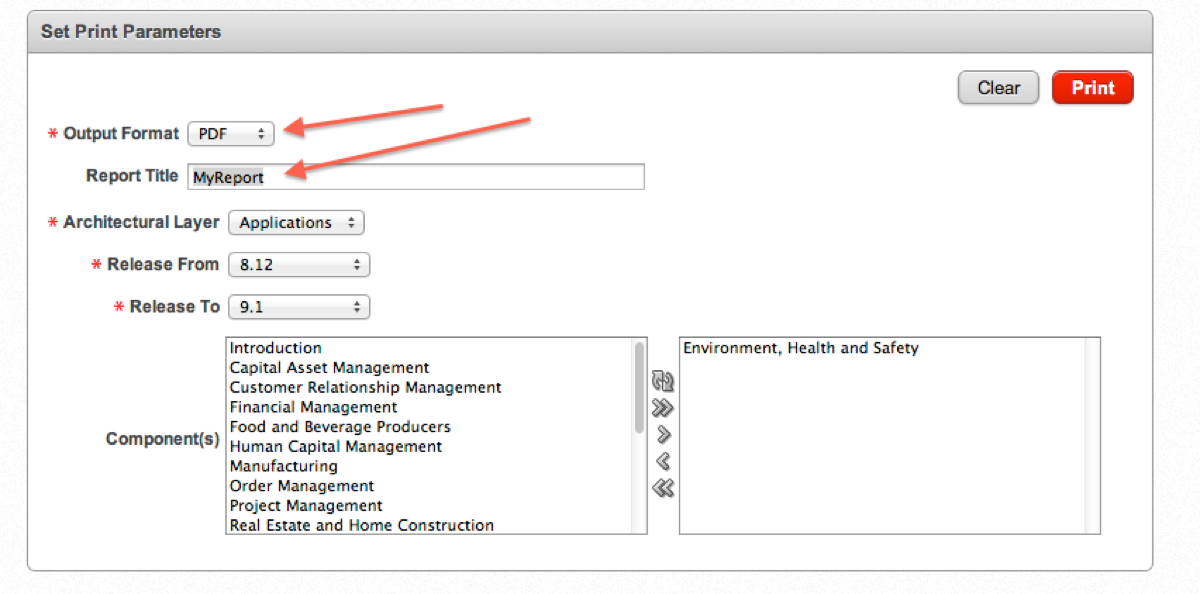
We all know that the 100 day upgrade is all about the technology, suits me to a tee. It's manageable and predictable and low risk. Although your business case might be looking a little light without too many functional improvements. Sure you can tell the CFO that money will be saved, but where are all of the big hitters for phase 2 and phase 3. Mention them in the business case of course! How can you get a good succicint list of the enhancements between your release and the latest release? Easy! Follow the following: 1. goto http://www.upgradejde.com 2. choose resources http://www.upgradejde.com/resources.htm UpgradeResources Oracle Product Features (eUVP) -Detailed net change and statement of direction information between all JD Edwards releases (past, present and planned). Replaces paper Upgrade Value Proposition 3. Log into MOS MOS Login 4. Accept disclaimer 5. Choose JD Edwards EnterpriseOne https://apex.oracle.com/pls/apex/f?p=24153:100:14242335010598:SET_PRODUCT:::PRODUCT_ID,PRODUCT_NAME:208136276869697198410960926144257606832,JD%20Edwards%20EnterpriseOne 6. CompareReleases 7. Choose your from and to release and also what modules you want to report on. CompareRelease2 8. Choose search 9. Select run report RunReport 10. Fill out your more advanced selections ChooseReportParameters Remember to choose your format, XML, XLS, words, pdf etc 11. Print to download

Tuesday, 22 January 2013

ORA-12899 and AS/400 to Oracle conversions

AS400 data conversion problems are killing me at the moment.  Well not literally, but they are very annoying.  If EBCIDIC was more like ASCII, I think that many of my problems would go away.

I have a site that is moving from AS/400 to Oracle, I have no idea how some of their data has made it into the base AS400 tables, but it's there.  There are a lot of crazy characters (tab, 'ç¢éDz, etc) in the tables.  So when I do a copy to oracle I get the old ORA-12899.  This is quite a pain, it only occurs when the field on the 400 is full (when there is 30 chars) and one of them is a special char.  It seems that the single byte ascii code does not exist for the char, so when it gents banged into a CHAR field in oracle it spills into two characters.

When you do a length(field) of the column, you see 31, yet when you do a length(field) you get 30.  So it takes more bytes to represent the string.  That is a pain!  of course I've tried various combinations of setting blank trimming, but alas none of this works for my situation.


SQL> sho parameter blank_trimming ;

NAME                                 TYPE        VALUE
------------------------------------ ----------- ------------------------------
blank_trimming                       boolean     TRUE

Now, I'm thinking that there might be something with the CHARACTERSET values, but then again... I'm moving to unicode eventually - I'm not there yet.

SELECT value$ FROM sys.props$ WHERE name = 'NLS_CHARACTERSET' ;
SELECT value$ FROM sys.props$ WHERE name = 'NLS_NCHAR_CHARACTERSET' ;

AL32UTF8  *this is not supported
UTF8  *this is not support

Great!  Thanks for the top database provisioning!  This is my problem, but I'm looking at a different solution that complete database rebuild.

I appreciate that I should have UTF16 (or WTF16!) for the NLS_CHARACTERSET.  This would probably sort everything out, and why you ask?

AL32UTF8 is a varying width characterset, which means that the code for a character can be 1, 2, 3, or 4 bytes long. 

So, I have some of my characters that are being represented by multiple bytes.  What can I do... 

This is a temporary problem for me, as I want to convert to unicode asap, so I don't really feel the need for changing the NLS_CHARACTERSET.

I'm going to cleanse the data in oracle - how might you ask?  Easy, I tell you...  but it's quite a bit of work.

Firsty, I used R98403 to copy all my data from AS/400 to oracle.  I was then able to read the reports or reconcile the row counts and know which tables had issues with ORA-12899 - about 12.

F0006 for example, this is how to cleanse out the crappy characters:

--segregate the problem data only
create table TESTDTA.F0006broke as (
select *
 from crpdta.f0006@cms t1 
WHERE not exists
(select 1
from testdta.f0006 t2
where t1.mcmcu = t2.mcmcu
));
--find what is wrong with the data
insert into testdta.f0006 select * from testdta.f0006broke;
--review data
select lengthb(mcdl01), length(mcdl01), translate(mcdl01,'ç¢éDz'||chr(5)||chr(13)||chr(10), 'cceC2   '), 
lengthb(translate(mcdl01,'ç¢éDz'||chr(5)||chr(13)||chr(10), 'cceC2 ')) FROM testdta.f0006broke ;
--fix data
update testdta.f0006broke set mcdl01 = translate(mcdl01,'ç¢éDz'||chr(5)||chr(13)||chr(10), 'cceC2   ') ;
commit;
--insert data
insert into testdta.f0006 select * from testdta.f0006broke;
commit ;

that was not too hard now was it?

You will also note that the NCHAR_CHARACTERCODESET is also wrong, it must be The EnterpriseOne Unicode data must be stored in UTF16, not UTF8.

Doh, might be back to the drawing board for this one!


Friday, 14 December 2012

Oracle DBA tips for CNC

Sure, you might know it all about databases, but this is not for you.  This is for me, when I forget all of these commands next week...  I've got somewhere to go!

Stay tuned for some banter about CHAR to NCHAR, it's my next port of call!

List your table spaces and space remaining:


SELECT
df.tablespace_name AS "Tablespace",
df.bytes / (1024 * 1024 * 1024) AS "Size (GB)",
Trunc(fs.bytes / (1024 * 1024 * 1024)) AS "Free (GB)"    
FROM
(
SELECT
tablespace_name,
Sum(bytes) AS bytes
FROM
dba_free_space
GROUP BY
tablespace_name
) fs,
(
SELECT
tablespace_name,
SUM(bytes) AS bytes
FROM
dba_data_files
GROUP BY
tablespace_name
) df
WHERE
fs.tablespace_name = df.tablespace_name
ORDER BY 3 desc


Tablespace                     Size (GB)              Free (GB)              
------------------------------ ---------------------- ---------------------- 
PRODDTAT                       12.05078125            7                      
UNDOTBS1                       3.7109375              3                      
TESTDTAT                       21.953125              2                      
TESTDTAI                       20.953125              1                      
PRODDTAI                       1.953125               1                      
SYS7333T                       0.029296875            0                    

List your datafiles and amount used:


Now, list your database files and how much of them are being used, whether they are autoextend


SELECT substr(df.file_name,1,45),
df.tablespace_name,
df. status,
(df.bytes/1024000) t,
round((fs.s/df.bytes*100),2) p,
decode (ae.y,1,'YES','NO') a
FROM dba_data_files df,
(SELECT file_id,SUM(bytes) s
FROM dba_free_space
GROUP BY file_id) fs,
(SELECT file#, 1 y
FROM sys.filext$
GROUP BY file#) ae
WHERE df.file_id = fs.file_id
AND ae.file#(+) = df.file_id
--AND df.tablespace_name in ('TESTDTAT', 'TESTDTAI')
ORDER BY t desc;


/u02/jdedwardsppack/ORCL/Tables/proddtat02.db PRODDTAT AVAILABLE 10485.76 60.23 NO
/u02/jdedwardsppack/ORCL/Tables/testdtat03.db TESTDTAT AVAILABLE 10485.76 2.11 NO
/u02/jdedwardsppack/ORCL/Tables/testdtat05.db TESTDTAT AVAILABLE 5242.88 41.99 NO
/u02/oracle/oradata/jdepoc/undotbs01.dbf UNDOTBS1 AVAILABLE 3891.2 91 YES
/u02/jdedwardsppack/ORCL/Tables/dv910t02.dbf DV910T AVAILABLE 3686.4 16.14 YES
/u02/jdedwardsppack/ORCL/Tables/testdtai05.db TESTDTAI AVAILABLE 2097.152 70.75 NO


If you are running out of space, add some more:


ALTER TABLESPACE testdtat ADD DATAFILE '/u02/jdedwardsppack/ORCL/Tables/testdtat04.dbf' SIZE 5G ;

Check that the physical file system can extend of course (df -k /u02)

If you need some space back, you could try a:

alter database datafile '/u02/jdedwardsppack/ORCL/Tables/proddtat03.dbf' RESIZE 100M ;

Note that all of the above is pretty hard.  If you have command line on the DB server, check if emctl is running:

>emctl status dbconsole

Oracle Enterprise Manager 11g Database Control Release 11.2.0.3.0
Copyright (c) 1996, 2011 Oracle Corporation.  All rights reserved.
https://aubdc00-jdb01t:1158/em/console/aboutApplication
Oracle Enterprise Manager 11g is not running.
------------------------------------------------------------------
Logs are generated in directory /u01/app/oracle/product/112/aubdc00-jdb01t_jdepoc/sysman/log

The above gives you the URL to go to for the dbconsole.  This is a great graphical way of doing everything easily.  You can chuck the above scripts in the bin and click all your problems away!  (of course, unless you are like me where the console will not start :-(


Refresh your TEST environment with DATAPUMP JDE


Please do not use R98403, if you are - you might need to give up on CNC, or at least read on.  If you are on a 400, data refresh is easy (cept for that damn auditing!!!).  If you are oracle use data pump, if you are SQL, back / restore and sp_changeObjectOwner!

Here is the data pump instructions:

create directory myDpump as '/u02/oracle/dpump' ;

grant READ,WRITE ON DIRECTORY myDpump TO JDE_ROLE ;

then execute the datapump for an export and then an import.

I tend to use parfiles, so I can move them from site to site.

expdp PRODDTA/PRODDTA@JDEPOC parfile=./prod.par


# PD expdp parfile
schemas=PRODCTL,PRODDTA
#content=data_only
content=all
#directory=data_pump_dir 
directory=data_pump_myriad_dir 
dumpfile=prod.dmp
logfile=prod_expdp.log   
job_name=prod_expdp


impdp TESTDTA/TESTDTA@JDEPOC parfile=./prod.par


# DV impdp parfile
schemas=PRODCTL,PRODDTA
remap_schema=PRODCTL:TESTCTL,PRODDTA:TESTDTA
remap_tablespace=PRODCTLI:TESTCTLI,PRODCTLT:TESTCTLT,PRODDTAI:TESTDTAI,PRODDTAT:TESTDTAT
#table_exists_action=truncate
table_exists_action=replace
#content=data_only
content=all
#directory=data_pump_dir 
directory=data_pump_myriad_dir 
dumpfile=prod.dmp 
logfile=test_impdp.log
job_name=test_impdp
#parallel=4

Thanks to Craig VDV for giving me a start on this one!  

If you are enterprise edition of the DB, bang in a parallel=4 at the bottom - this will kick of 4 threads to do your work.


Thursday, 13 December 2012

DB link from Oracle to AS/400 - platform migration integrities - AS/400 to oracle

I must say thanks to SVDS (any CNC in Aus will know who this is).  He showed me this wonderful creation and I'm in debt to him for it.

Now, here is something that has saved me a lot of time and a lot of heart ache!  I've used a db link between oracle and AS/400.  This has been invaluable for running integrities between my upgrade / platform migration.  

Essentially you create a DB link on the oracle side and then use the @DBLINK sytax at the end of the table when referring to AS/400 based tables - awesome!

To see information about links, use SQL like:


COL OWNER FORMAT a10
COL USERNAME FORMAT A8 HEADING "USER"
COL DB_LINK FORMAT A30
COL HOST FORMAT A7 HEADING "SERVICE"
SELECT * FROM DBA_DB_LINKS

http://docs.oracle.com/cd/B19306_01/gateways.102/b16222/using.htm#i20148 is a good place to start


Create the link


CREATE DATABASE LINK myAS400
        CONNECT TO ONEWORLD IDENTIFIED BY NUMPTY99
        USING 'SHANNON.WORLD';


Where your tns_name_entry is defined something like:


SHANNON.WORLD =
  (DESCRIPTION =
    (ADDRESS_LIST =
    (ADDRESS = (COMMUNITY = tcp.world)(PROTOCOL = TCP)(Host = xx.77.66.44)(Port = 1521))
    )
    (CONNECT_DATA =
      (SID = ORAGATE)
    )
    (HS = OK)
  )

What I hear you say, surely it cannot be that simple...  And yet it is.  For simple SQL this is a blast.  Here are some examples:

See if all the custom objects made it over from XE:


select t1.siobnm, t1.sisy, t2.sistce from ol7333.f9860@myAS400 t1, ol7333.f9861@cms t2 
where t1.siobnm = t2.siobnm and t2.sipathcd = 'DV7333'
and t1.siobnm in (select siobnm from ol7333.f9860@myAS400 t3 where not exists
(select 1 from ol910.f9860 t4
where t3.siobnm = t4.siobnm) 
and t3.siobnm like '%55%');

Data count reconciliation between XE and JDE91 with platform migration from AS/400 to Oracle

create table testdta.rowcounts (table_name varchar (20), AS400_count integer, oracle_count integer) ;
/*  Add your table names from 9.1 data */
insert into testdta.rowcounts (select table_name, 0, 0 from all_Tables where owner = 'PRODDTA') ;
commit ;

/*  Add any tables from the 400 that may not already be in the reconciliation table */
insert into testdta.rowcounts (
select table_name, 0, 0
from qsys2.systables@myAS400  t1
where table_schema = 'TESTDTA'
and not exists (select 1 
  FROM all_tables
  WHERE owner = 'PRODDTA'
  AND table_name = t1.table_name)) ;


/*  update the AS/400 row count data  - you need to run the results of this statement*/
select 'UPDATE TESTDTA.ROWCOUNTS set AS400_count = ( SELECT COUNT(1) FROM ' || 'TESTDTA.' || table_name || '@CMS ' || ') WHERE table_name = ''' || table_name || ''';' 
from qsys2.systables@CMS t1
where table_schema = 'TESTDTA'

/*update the oracle row counts - you need to run the results of this statement*/
select distinct 'UPDATE TESTDTA.ROWCOUNTS set oracle_count = ( SELECT COUNT(1) FROM ' || 'PRODDTA.' || table_name || ' ' || ') WHERE table_name = ''' || table_name || ''';' 
from all_tables t1
where owner = 'PRODDTA'
commit ;

/*  here is your data, NICE! */
select * from TESTDTA.rowcounts where (as400_count <>0 or oracle_count <> 0);


Refresh TASKS from PS910

I was missing fast path and other options on my fat client after an upgrade.  It was quite annoying.  I ran the following scripts to insert all PS records that did not exist:


insert into prodctl.f9000 t1
(select * from ps910ctl.f9000 t2
where not exists (select 1 from prodctl.f9000 t3
where t3.tmtaskid = t2.tmtaskid or t3.tmtasknm = t2.tmtasknm));
commit ;


insert into prodctl.f9001 t1
(select * from ps910ctl.f9001 t2
where not exists (select 1 from prodctl.f9001 t3
where t3.TRRLTYPE = t2.TRRLTYPE
and t3.TRFRMREL =t2.TRFRMREL
and t3.TRTHRREL =t2.TRTHRREL
and t3.TRPARNTTSK =t2.TRPARNTTSK
and t3.TRCHILDTSK =t2.TRCHILDTSK
and t3.TRPRSSEQ =t2.TRPRSSEQ ));
commit;

But, they hardly inserted a row (I'm keeping them here for next time that I need to run them).

I eventually found the following:
https://support.oracle.com/epmos/faces/DocContentDisplay?_afrLoop=403346239050589&id=654116.1&_afrWindowMode=0&_adf.ctrl-state=41yvw5yrg_4

This was all about task view 29 (Which is the tools task view in 812 and above).  this was not secured, it did not EXIST!  I added task view 29 (because I could get to P9000) and then was able to see all of the proper menus.


OneWorld client install DEV client THICK client FAT client

Lots of things with E1 have got easier.  SM makes tools releases easier.  We makes client deploys easier.  9.1 makes viewing graphs easier (OVR).  Why is the fat client SO difficult!!

See the following link for trooublshooting the fat client / dev client install issues

https://support.oracle.com/epmos/faces/ui/km/DocumentDisplay.jspx?_afrLoop=362486124486969&id=1085806.1&_afrWindowMode=0&_adf.ctrl-state=ywdtqyeuj_244

Then also check the guides
http://docs.oracle.com/cd/E24902_01/doc.91/e18843/toc.htm

I'm currently having a problem that I cannot select any packages because of "invalid package".  This is true for all of the packages that I built and the ones that I did not.  It's frustrating with all of the different 

When installing the oracle database piece, I get the following:
"The command failed with error 1."

So, I then found a 9MB file in c:\program files\oracle\inventory\logs\cloneActions..

This said "service already exists...", Arrgghh that's right.  I cleaned up the reg and all files, did not delete the services from the previously aborted install.  Remember to run regedt32 to get rid of the correct 32 bit settings.

sc delete < SERVICE name>
sc delete oracleE1LocalClrAgent
sc delete oraclemtsrecoveryservice


I again delete c:\oracle (not default location without giving you an obvious choice (you can edit settings.ini on the deployment server (under oneworld client install\thirdparty\oracle) and change the default DIR...

Delete registry settings

delete c:\oracle; c:\program files\oracle; c:\program files x86\oracle

restart

try install again, this is using the \\oneworld client install\installManager.exe, as this is the one that installs the DB component.

Steps required

  1. Running Install Manager
  2. Installing a local database
  3. Installing a local database client
  4. Installing the Development Client (this uses the Oracle Universal Installer (OUI)).
  5. Troubleshooting any installation errors.

    Running the Development Client.

So, it's finally working - but... I get
INFO: Command = oracle.sysman.ccr.configCCR.CloneCCRPlugIn 
Command = oracle.sysman.ccr.configCCR.CloneCCRPlugIn has failed  
Configuration assistant "Oracle Configuration Manager Clone" failed 
This is sooo Frustrating.

Find https://support.oracle.com/epmos/faces/DocContentDisplay?_afrLoop=375569752832977&id=1439675.1&_afrWindowMode=0&_adf.ctrl-state=75s8l64k0_34 which tells me that I need the 32 bit client installed first.  Oh man...  I thought that this was for the deployment server only.

Right, follow the delete instructions once again and then install the 32 bit client and then 64bit OEE, CNC is such a joy sometimes.  I did skim read the instructions listed above and I did NOT see this jump out at me...

Okay, all of that is done and we have one more hurdle.  The install logs started to complain that there was no sbf.CAB file to be found (I must have selected to build BSSV - and have done no config).  I removed this from the DV910FC.inf file in the package_inf folder, and BOSH...  install begins.